FYI for accounting firms: pricing, what it replaces, alternatives
What FYI does, the three plans and the five-user minimum, the Microsoft 365 requirement, whether it replaces Xero Practice Manager, what it costs at your size against Karbon, SuiteFiles and Microsoft 365 alone, the record-keeping and TFN rules it has to support, and the terms to read first. With a cost calculator, a fit quiz and a switching checklist.
On This Page
Most searches for "FYI Docs" are existing users looking for the login page (FYI now lives at fyi.app). This guide is for the practice owner deciding whether to buy it, keep it, or replace it. It answers the questions FYI's own pages leave you to piece together: what it really costs once the minimum users and Microsoft 365 are counted, whether it replaces Xero Practice Manager, what happens to your data, and what the alternatives cost. It's for a small Australian accounting or bookkeeping practice. I build accounting firm websites and have no relationship with FYI or its competitors. Prices are from each vendor's own pages, and the rules from the TPB's Code Determination, the Privacy Commissioner and the ATO.
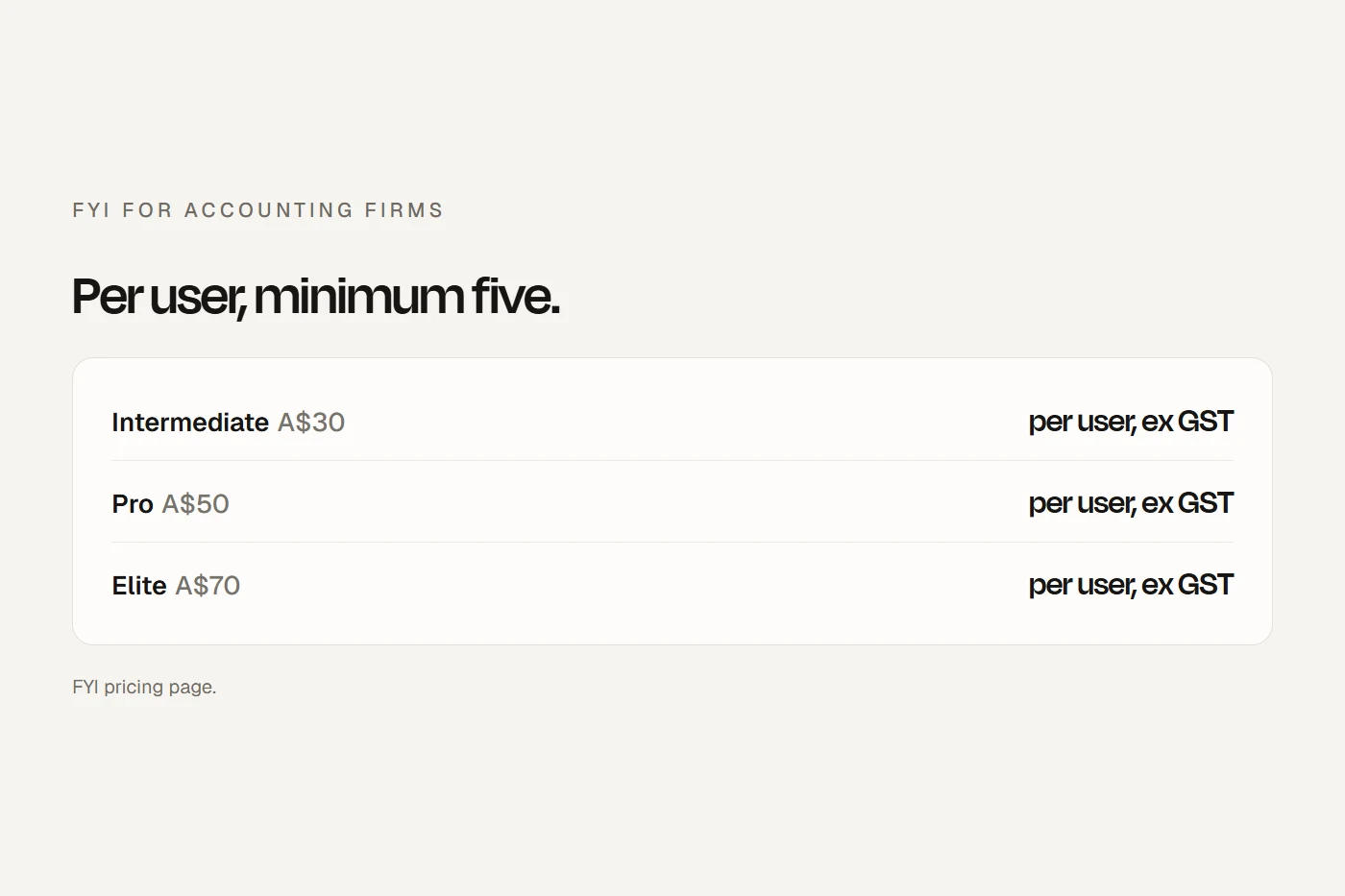
- Five users minimum, plus Microsoft 365FYI is A$30, A$50 or A$70 per user a month before GST, with Pro and Elite announced to rise to A$55 and A$75, and a five-user minimum, so a two-person practice pays for five. It only works with Microsoft 365, which is another A$21 a user if you're not already on Business Standard.
- It sits on top of your practice managerFYI files emails and documents against clients and jobs synced from XPM or another practice manager. Only the Elite plan can take over time, WIP and invoicing, and only for practices on Xero ledgers.
- Its data is in SydneyFYI stores Australian practices' data in AWS Sydney and claims ISO 27001 and ATO digital service provider status. Read the terms on exports and price rises before you sign.
What FYI does
FYI is document and email management built for accounting practices. It files client emails and attachments from Outlook automatically, keeps documents in client workspaces, and links them to the clients and jobs synced from your practice manager: Xero Practice Manager on every plan, or MYOB AE, APS, CCH, IRIS or GreatSoft on Intermediate and Pro. It also pulls tax assessments from Xero Tax and files them. On higher plans it adds workflows, automation, a client portal and, on Elite, time, billing and reporting.
What it doesn't do: it has no built-in e-signing (it sends documents out through DocuSign, Adobe Sign, Annature or FuseSign, each a separate subscription), no payments, and no tax lodgment. And it doesn't work with Google Workspace at all.
The plans
| Intermediate | Pro | Elite | |
|---|---|---|---|
| Per user a month, before GST | A$30 | A$50, rising to A$55 | A$70, rising to A$75 |
| Minimum users | 5 | 5 | 5 |
| Email filing and document management | Yes | Yes | Yes |
| Practice manager sync | XPM or others | XPM or others | XPM only, or FYI as practice manager |
| Workflows and custom automation | Samples only | Yes | Yes |
| Client portal (Collaborate) | No | Yes | Yes |
| Timesheets into XPM | No | Yes | Yes |
| Time, billing, reports, capacity planning | No | No | Yes |
| Custom forms | No | No | Yes |
Scroll the table sideways to see every column.
From FYI's pricing page, which announces the Pro and Elite increases. It's month to month with a 30-day free trial of the Pro features. Onboarding is quoted separately: QuickStart from $990 if you don't need help moving documents, Assisted from $3,000 if you do, and Concierge on quote. FYI doesn't say whether those include GST, so ask.
The Microsoft 365 requirement
FYI says plainly it is "only available for practices using Microsoft 365". Users log in with their Microsoft 365 accounts, and FYI says Business Standard is the minimum licence to edit documents from FYI in the desktop Office apps. On Microsoft's Australian prices, Business Standard is A$21 a user a month on an annual plan, or A$25.20 monthly, before GST. If your practice is already on Business Standard, it costs you nothing extra; if you're on Google Workspace, FYI isn't an option.
It also means FYI's multi-factor login is whatever you set in Microsoft 365. Microsoft's free security defaults turn on multi-factor sign-in for every user. Switch them on.
Does FYI replace Xero Practice Manager?
Usually not. On Intermediate and Pro, FYI sits on top of XPM: clients, jobs and team sync across, and XPM stays your practice manager. XPM fills the gap FYI doesn't: it has no email filing, document management or client portal of its own.
Elite can take over XPM's time, WIP and invoicing, but with conditions:
- FYI says Elite's practice management features need a Xero ledger connected, so it suits practices whose clients are on Xero.
- You have to be an existing FYI customer to adopt Elite, and there's no Elite trial.
- Moving brings across your WIP, unpaid invoices and up to 18 months of paid invoices and timesheets. Going back to Pro plus XPM is an eight-step process.
- Practices that keep XPM connected still sync with it.
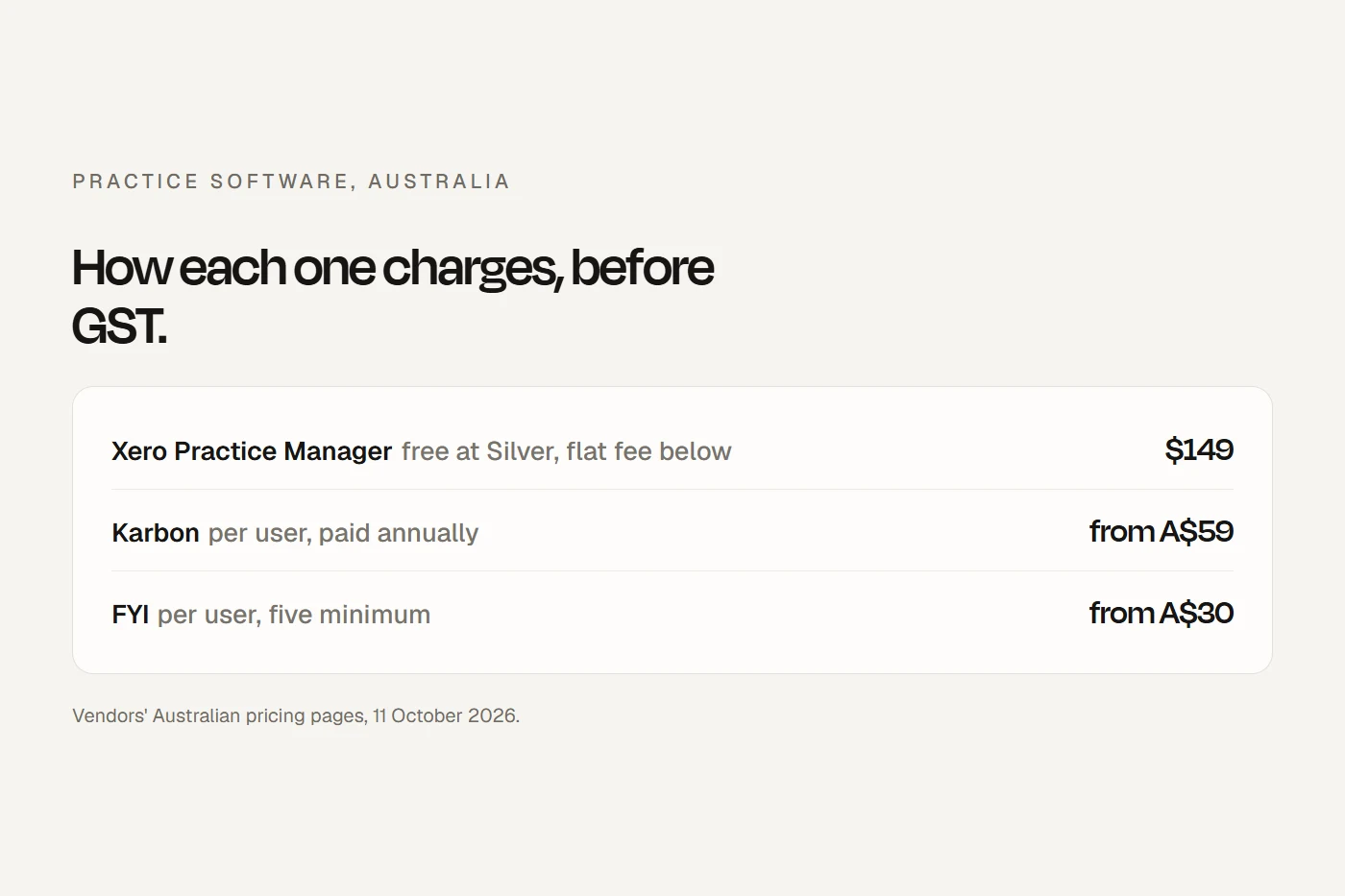
Price decides the rest. XPM is free at Xero Silver partner status and above, and A$163.90 a month including GST (A$149 before) for up to ten users below that. At Silver and above, Pro on top of free XPM is always cheaper than Elite. Below Silver, Elite works out cheaper than Pro plus paid XPM up to seven users, and dearer from eight. The calculator below does the sum for your practice.
What it costs at your size
All before GST, at each vendor's published prices, using FYI's announced new Pro and Elite prices.
The five-user minimum is the big lever for a small practice: two people pay for five seats, so each effectively costs two and a half times the list price. Add one-off onboarding, a signing tool if you need one, and GST on top.
The alternatives
| FYI | XPM | Karbon | SuiteFiles | Microsoft 365 only | Nimbus (MYOB) | TaxDome | |
|---|---|---|---|---|---|---|---|
| Price basis, before GST | A$30 to A$75 per user, minimum 5 | Free at Silver and above; otherwise flat up to 10 users | A$59 to A$109 per user | From A$230 to A$300 a month for 5 or 10 users | A$10.50 to A$32.90 per user | A$30 to A$50, minimum 3 users | A$1,300 to A$1,500 per seat a year |
| Email filing | Yes, from Outlook | No | Yes | Yes | Manual | Top plan | Not checked |
| Client portal | Pro and Elite | No | Yes | Super Suite | Basic sharing | Yes | Yes |
| E-signing | Through a separate tool | Xero Sign bundles | Credits | Super Suite | No | Yes | Yes |
| Practice management | Elite, Xero ledgers | Yes | Yes | No | No | Through integration | Yes |
| Google Workspace | No | Yes | Yes | Built on Microsoft 365 | n/a | Not checked | Not checked |
| Data location stated | Sydney | Not stated | Not stated | Not stated | Australia for Australian tenants | "Regional" | Not stated |
Scroll the table sideways to see every column.
- Karbon is the most direct alternative if you want one tool for email triage, workflow, client portal and billing, and it works with Microsoft or Google email. It doesn't name a hosting country on its security page. Its own "Karbon vs FYI" page is out of date on FYI's plans and minimum users.
- SuiteFiles is document management built on Microsoft 365, with signing and a portal on its higher plan, but no practice management.
- Microsoft 365 alone is the cheapest: SharePoint and OneDrive store and share files, but nothing files client emails or syncs with your practice manager for you.
- Nimbus, now part of MYOB, is a document manager and client portal for MYOB practices.
- TaxDome bundles practice management, portal, e-signing and billing, priced per seat per year, and doesn't state where Australian data is held.
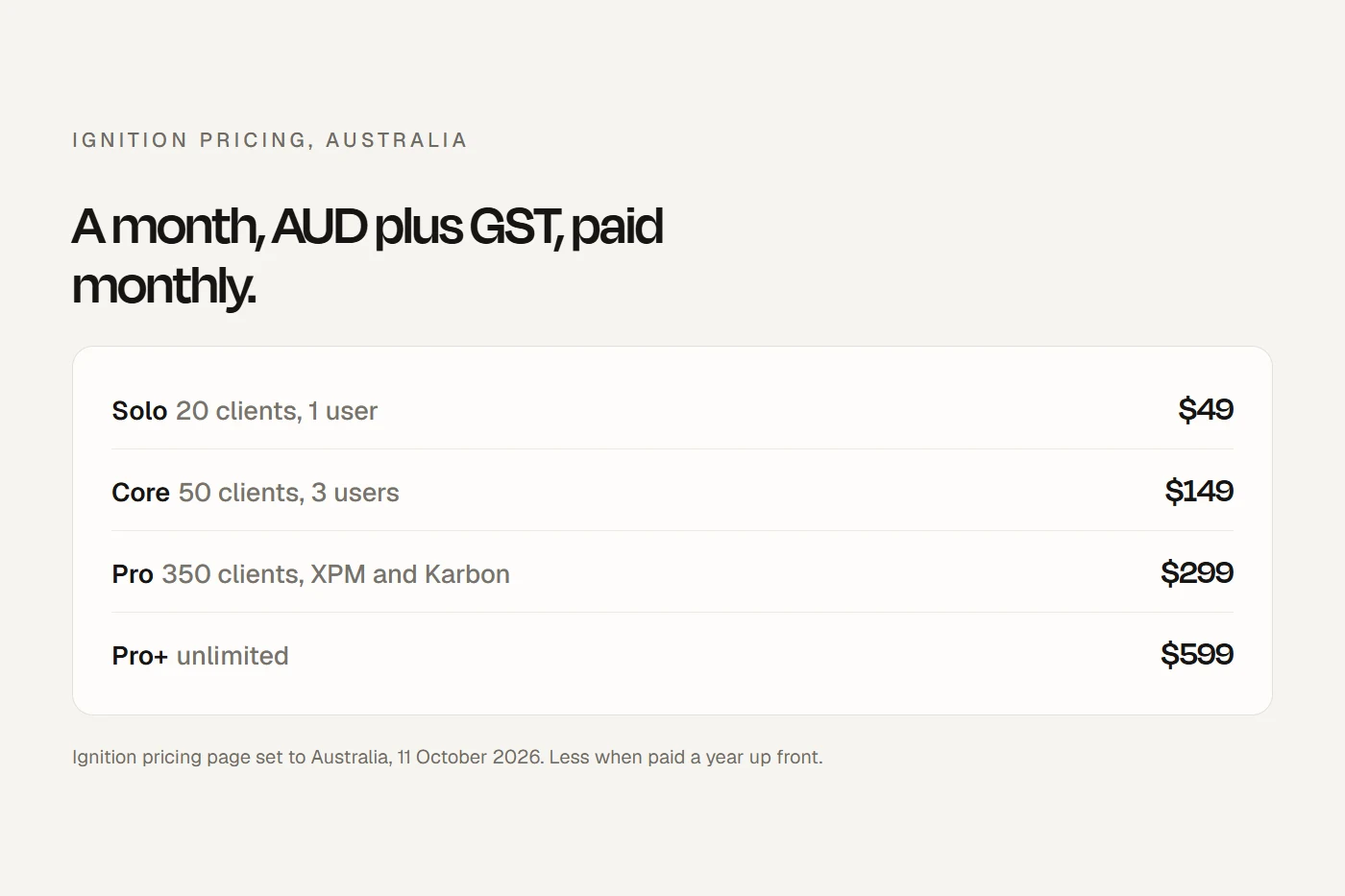
- Ignition handles proposals, engagement letters and billing; it connects to FYI on its Pro plan and above. See my Ignition review.
The rules your document system has to support
- Records: the TPB's Code Determination requires registered agents to keep records of the services they provide, including all advice given to and received from the client, for at least five years after the service. A system that files emails with the client file helps; so does making sure old records stay readable after you leave a vendor.
- Tax file numbers: the TFN Rule applies to every practice holding TFNs, whatever its size: restrict access to staff who need it, and destroy or de-identify TFN records once you no longer need them. FYI's cabinet and client security settings are the matching feature.
- Data breaches: breaches involving TFNs are notifiable for every TFN recipient, even small practices otherwise outside the Privacy Act. The Privacy Commissioner's own example is an accountant who emailed a spreadsheet of past clients' TFNs to his whole contact list.
- Cloud and overseas data: using a cloud provider doesn't hand your security obligations to it. FYI's core data is in Sydney, but its in-app guide tool is US-hosted by default, and add-ons such as Content Snare store data in the US. If the Privacy Act covers your practice, name overseas locations in your privacy policy. Practices providing designated services under the new anti-money laundering rules are now covered regardless of turnover.
- Signatures: clients can give tax return and activity statement declarations by email without a scanned signature. E-signatures are valid for most Commonwealth purposes, but deeds signed by individuals and anything needing a witness depend on the state.
- The ATO's security rules for software (multi-factor login, onshore hosting by default) bind the software vendor, not your practice. FYI says it's an ATO-approved digital service provider.
Read the terms before you sign
FYI's terms are worth five minutes. The licence renews monthly; fee increases can apply seven days after you're told; FYI may charge for exporting your data; it gives 90 days' written notice before deleting data after you leave; its liability for data loss is capped at one month's fee; and your data may be processed by its AI systems, including to improve its services. None of that is unusual for the category, but plan your exit before you need it.
Do you need FYI?
Before you switch
Your ticks save in this browser.
- Keep five years of records readable, including advice given and received, after you leave the old system.
- Clean your folders first: client folders at one level, and client codes that match XPM.
- Price the onboarding, and ask whether it includes GST.
- Check Microsoft 365 licences: Business Standard or higher for every FYI user.
- Turn on multi-factor sign-in in Microsoft 365.
- Lock down TFNs to the staff who need them, and set a routine to destroy what you no longer need.
- Map where data goes, including add-ons, and update your privacy policy if needed.
- Read the vendor terms on price rises, exports and deletion.
- Write a breach plan: who assesses a suspected breach, and who notifies.
- Choose a signing tool, and check its plan includes the FYI integration.
- Thinking about Elite later? You must be on FYI first, and reversing it is an eight-step process.
My view
FYI is very good at the thing it's built for: getting client email and documents out of individual inboxes and into a shared, searchable client file on Microsoft 365. For a practice of five or more already on Microsoft 365 and XPM, it's an easy recommendation to trial. For two or three people, the five-user minimum and the Microsoft 365 requirement change the sums, and a simpler tool may do. And whichever you pick, read the exit terms before the data goes in.
Questions I get asked
How much does FYI cost?
A$30, A$50 or A$70 per user a month before GST for Intermediate, Pro and Elite, with Pro and Elite announced to rise to A$55 and A$75, and a five-user minimum. Onboarding is extra, from $990, and you need Microsoft 365.
Does FYI work with Google Workspace?
No. FYI says it is only available for practices using Microsoft 365.
Does FYI replace Xero Practice Manager?
On Intermediate and Pro, no: it sits on top of XPM. On Elite it can take over time, WIP and invoicing for practices on Xero ledgers, but you have to be an FYI customer first.
Where does FYI store data?
FYI says Australian and New Zealand practices' data is stored in AWS data centres in Sydney. Its in-app guide tool is hosted in the US by default.
What's the difference between FYI and Karbon?
FYI is document and email management built on Microsoft 365 that syncs with your practice manager. Karbon is a practice management tool with email triage, workflow, a client portal and billing, and it works with Microsoft or Google email.
About this guide
Written by Joseph Alzein, founder of bdog. bdog builds accounting firm websites and has no relationship with FYI or any vendor here. Prices and features were read from each vendor's own pages, and the rules from the Tax Agent Services Code Determination, the Privacy Commissioner, the ATO and the Attorney-General's Department. Sources were checked on 12 October 2026. Prices change, so check before you sign. This is general information, not legal advice.
Main sources:
- FYI pricing
- FYI: frequently asked questions
- FYI: Elite plan
- FYI: onboarding services
- FYI: security and reliability
- FYI: terms and conditions
- Xero: Partner Hub and practice management
- Karbon pricing
- SuiteFiles pricing
- Microsoft 365 Business Standard
- Tax Agent Services Code Determination
- OAIC: the TFN Rule
- ATO: client declarations