Squarespace vs WordPress: which suits an Australian business?
One bill and nothing to maintain, or free software you can take anywhere if someone looks after it. Here’s how they compare in Australia: prices with GST, renewals, bookings, support hours, speed, and what you can take with you.
On This Page
Squarespace and WordPress suit different kinds of owner more than different kinds of business. Squarespace is one bill and nothing to maintain. WordPress is free software that can do almost anything, as long as someone looks after it. I sell websites on subscription, so I compete with both, and I've tried to give each a fair hearing using what matters in Australia: prices in Australian dollars, GST, renewal prices, bookings, .com.au domains, support hours in our time zone, and how fast each one is for real Australian visitors.
One thing to get straight first. "WordPress" means two different products. WordPress.com is a hosted service, a bit like Squarespace, priced in US dollars. Self-hosted WordPress is the free software you install with a hosting company. Most "WordPress" advice, and most of this guide, is about the self-hosted kind.
- Choose Squarespaceif you want one bill, polished templates and nothing to update, and you're happy to stay on Squarespace.
- Choose self-hosted WordPressif you want to own the whole site, keep data in Australia, or need features Squarespace doesn't have, and someone will keep it updated.
- Cost is closefor a simple site over three years. The real difference is the time WordPress takes to look after.
Prices, help pages and speed data here were read from Sydney on 11 October 2026. Prices change, so check before you buy.
Side by side
| Squarespace | Self-hosted WordPress | WordPress.com | |
|---|---|---|---|
| Price shown to Australians | Australian dollars, GST added on top | Depends on your host; watch intro and renewal prices | US dollars, excluding tax |
| Cheapest plan that can embed booking code | Core, A$28 a month billed annually | Any host | Plugins on every paid plan |
| Built-in booking | Acuity, a separate subscription from US$16 a month | Booking plugins, many with free versions | Booking plugins |
| Sells .com.au domains | Yes, new ones only; you can't transfer one in | Through your registrar | No |
| Updates | Squarespace does them | Minor core updates are automatic; plugins and themes are yours to update | Core updates done for you; plugins are yours |
| Sites passing Core Web Vitals, Australian mobile visitors | 64.7% | 53.9% (all WordPress sites) | 64.2% |
| Take it with you | Some pages, one blog and images, not the design | The whole site | The whole site |
| Phone support | No | Depends on the host; some Australian hosts have it | No |
| Data stored in Australia | No, in the US | Yes, if your host has Australian servers | No, in the US and EU |
Scroll the table sideways to see every column.
What each costs
Squarespace
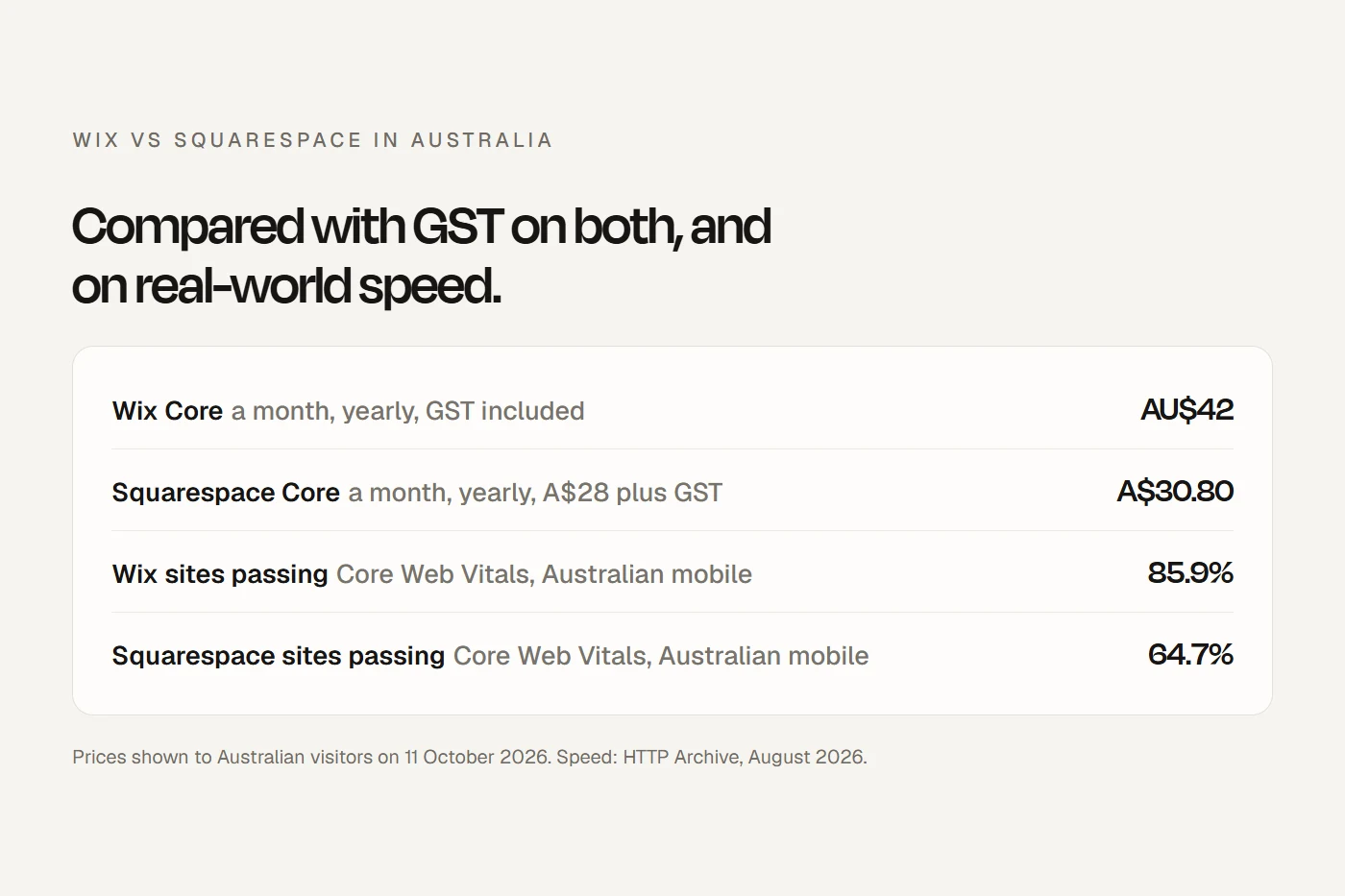
Four plans, priced in Australian dollars before GST. Squarespace's pricing page says its prices "don't include GST", so add 10% unless you give it a GST-registered ABN.
| Plan | Billed annually, a month | Billed monthly | Worth knowing |
|---|---|---|---|
| Basic | A$17 | A$24 | Can't embed booking code; 2% fee on online sales |
| Core | A$28 | A$39 | The one most service businesses need |
| Plus | A$49 | A$69 | Lower Squarespace Payments card rates |
| Advanced | A$109 | A$149 | The top plan, also with lower card rates |
Scroll the table sideways to see every column.
Hosting, security and an SSL certificate are included, and annual plans come with a free domain for the first year.
Self-hosted WordPress
The software is free; you pay a host, a domain, and anything extra you add. Australian hosts advertise low first-year prices that rise sharply at renewal:
| Host | First year, a month | Renews at, a month | Servers in Australia |
|---|---|---|---|
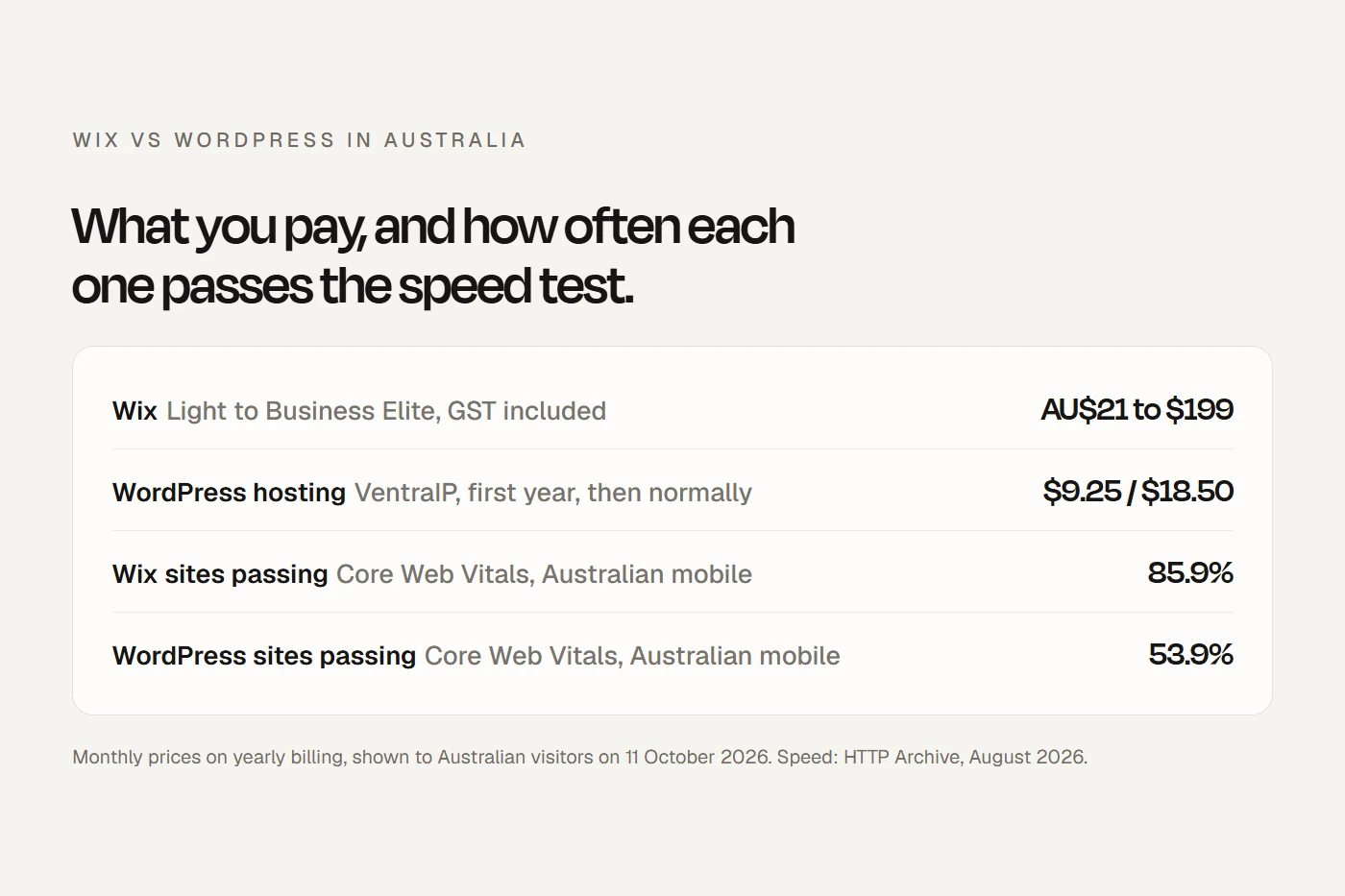
| VentraIP (WordPress hosting) | $9.25 | $18.50 | Sydney and Melbourne |
| SiteGround (StartUp) | A$4.99, before GST | A$26.99, before GST | Sydney, if you choose it |
| Hostinger (Premium) | A$4.39, with 48 months paid up front | A$15.89, before GST | Not stated |
Scroll the table sideways to see every column.
On top of hosting: a .com.au domain (VentraIP shows $9.95 for the first year, then $22.95), and optional paid extras, all in US dollars. A premium theme such as Avada is US$69 once. Yoast SEO Premium is US$118.80 a year, and a backup plugin like UpdraftPlus Premium starts at US$70 a year. The free versions of Yoast and the main backup and security plugins are used on millions of sites, and for a small business they're usually enough.
WordPress.com
Plans in US dollars, excluding tax, billed yearly: Personal US$4 a month, Premium US$8, Business US$25 and Commerce US$45. Plugins can be installed on every paid plan. WordPress.com doesn't sell .au domains, so you'd keep your .com.au elsewhere and connect it.
Three years, side by side
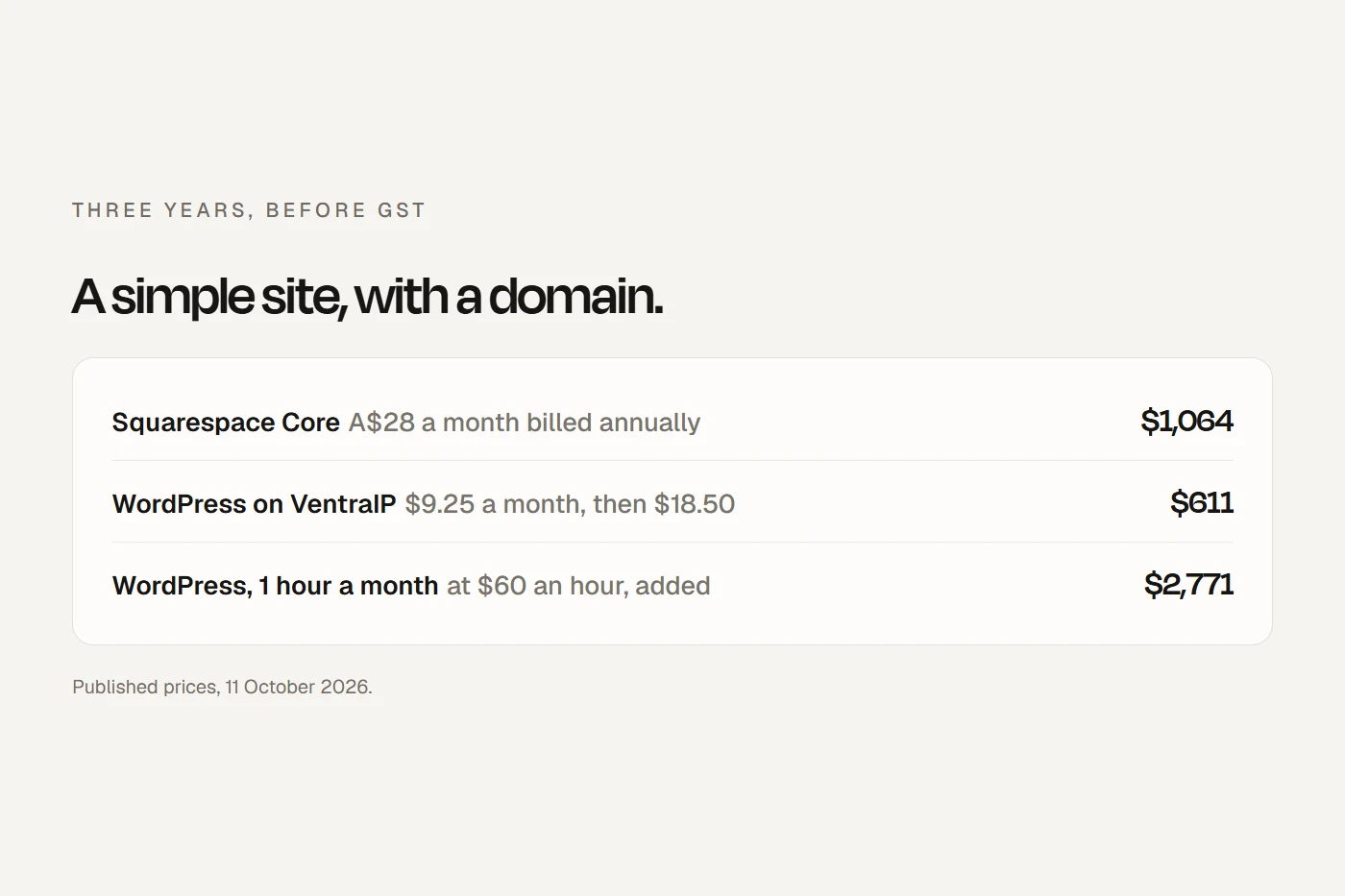
Change any number to match your situation. Everything is in Australian dollars before GST. If you add something priced in US dollars, convert it first.
On those starting numbers, Squarespace Core comes to about $1,064 over three years and WordPress on VentraIP about $611, before you count any time. Put in one hour a month at $60 and WordPress costs more than Squarespace. That's the honest trade: WordPress is cheaper in cash and dearer in attention.
VentraIP doesn't say whether its prices include GST, so check at checkout. And Hostinger's figure is four years paid up front, so it covers more than the three years shown. For the wider picture, including paying someone to build it, see how much a website costs in Australia.
Bookings
Squarespace's booking tool is Acuity Scheduling. It's a separate subscription priced in US dollars, from US$16 a month billed annually for one calendar, and cancelling your site doesn't cancel it. Acuity also works on self-hosted WordPress, so it isn't a reason to choose Squarespace. It can't be embedded on a site with a wordpress.com address, though.
If you already use practice or booking software such as Cliniko, Halaxy, Nookal or HotDoc, you don't need Acuity. Each gives you a button, a link or embed code. On Squarespace, embedding that code needs the Core plan or above; on Basic you can only link to it. On self-hosted WordPress there's no plan to upgrade.
WordPress also has booking plugins, several with free versions. LatePoint, Amelia, Bookly and Simply Schedule Appointments each have tens of thousands of active installs worldwide.
Taking payments
On a $150 booking paid with an Australian card:
| Processor | Rate | Fee on $150 |
|---|---|---|
| Stripe (either platform) | 1.65% + A$0.30, GST included | $2.78 |
| WooPayments (self-hosted WordPress) | 1.75% + $0.30 | $2.93 |
| Squarespace Payments | 1.8% + A$0.30 on Basic and Core | $3.00, plus Squarespace's 2% ($3.00) on Basic |
| PayPal (either platform) | 2.90% + A$0.30 | $4.65 |
Scroll the table sideways to see every column.
Squarespace's 2% transaction fee only applies on Basic. Its own pages disagree on whether Squarespace Payments is open to Australian businesses, but Stripe and PayPal work either way.
Speed for Australian visitors
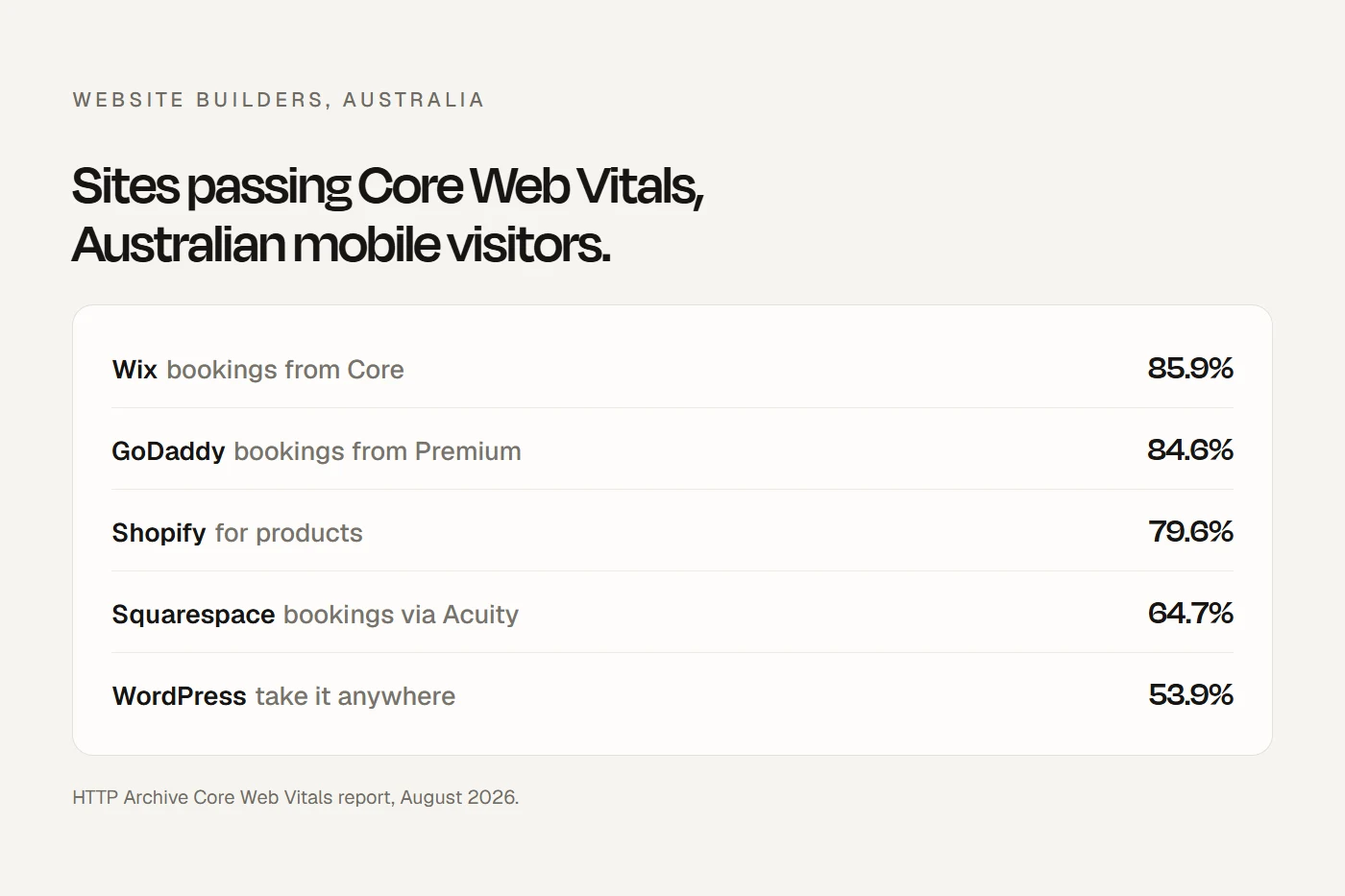
Google's Chrome browser records how fast real visitors find each site, and the HTTP Archive publishes it by platform. This is the share of sites passing all three Core Web Vitals on mobile.
Nearly all of the gap is in how fast the main content loads: 71.8% of Squarespace sites do it in good time for Australian mobile visitors, against 59.7% of WordPress sites. These are averages. "WordPress" includes every cheap host and heavy theme, and a well-built WordPress site on a good Australian host can beat a Squarespace site stuffed with large images.
On SEO, neither has an edge with Google. Squarespace builds in sitemaps, clean addresses and structured data; on WordPress, free plugins like Yoast or Rank Math do the same. What decides your ranking is what's on your pages and your Google Business Profile, not the platform. I go into that in local SEO for small businesses.
Upkeep and security
This is the real difference. Squarespace runs the hosting, the security and the SSL, and there's nothing for you to update. The exceptions are third-party Extensions and any code you paste in.
WordPress updates minor core releases by itself, but plugin and theme updates are opt-in, one by one. That matters, because that's where the risk is. Patchstack, a company that sells WordPress security, counted 11,334 new vulnerabilities in the WordPress world in 2025: 91% in plugins, 9% in themes, and 6 in WordPress itself. It found that 46% weren't fixed by the developer before they were made public, and that premium plugins and themes weren't safer than free ones. Fewer plugins, kept up to date, with backups, is the rule. Some hosts, VentraIP among them, offer to handle updates for you.
Support, in Australian hours
- Squarespace has no phone support. Email and social media run around the clock, and its help centre lists live chat on weekdays from 4am to 8pm US Eastern time. In Sydney that's roughly 7pm to 11am the next morning, so most of our business day falls outside it.
- WordPress.com has no phone either. Human support by chat is on paid plans, faster on Business and Commerce.
- Self-hosted WordPress support comes from your host. VentraIP has Australian-based support and a 13 number; SiteGround has 24/7 chat and an Australian number. Hosts help with hosting, not your theme or plugins.
If you leave
Self-hosted WordPress moves whole to any other host, and many hosts will move it for you. Squarespace exports to a WordPress-format file, but only some of the site: layout pages, one blog with its posts, text and images. Store pages, more than one blog, video and audio blocks, page headers and footers, and the design itself stay behind. If you cancel, the site goes offline; there's no free plan to fall back to.
Domains: you can't transfer an existing .com.au into Squarespace, only connect it. That's no bad thing. Keep your .com.au with an Australian registrar in your business's name, and it stays yours whatever platform you use. Under auDA's rules, moving a .au domain between registrars is free.
Where your data lives
Squarespace stores data in the US. WordPress.com stores it in the US and the EU, and says you can't restrict it to one place. Only self-hosted WordPress, on a host with Australian servers, keeps your site and its form submissions in Australia. For most businesses that's a preference, not a rule, but if your clients ask, it's the only option here that says yes.
Which fits you?
My view
If you'll build and edit the site yourself and never want to think about updates, Squarespace is the calmer choice, on Core if you take bookings. If owning the site outright or keeping data in Australia matters more, self-hosted WordPress on an Australian host, with someone responsible for updates. Don't choose WordPress to save $15 a month unless you'll really do the upkeep: Patchstack found about half of serious vulnerabilities are exploited within a day of being made public.
And if you'd rather not build it at all, that's a different question. I compare the options in website subscription or one-off build.
Questions I get asked
Is Squarespace or WordPress better?
Squarespace is better if you want nothing to maintain. Self-hosted WordPress is better if you want to own the whole site, keep data in Australia or add features Squarespace lacks, and someone will keep it updated.
Is Squarespace cheaper than WordPress?
In cash, usually not: Squarespace Core is about $1,064 over three years with a domain, before GST, and a simple self-hosted WordPress site about $611. Once you count the time WordPress takes to maintain, Squarespace is often cheaper.
Is Squarespace or WordPress better for SEO?
Neither has an advantage with Google. Squarespace builds in the basics; on WordPress, a free plugin covers them. Squarespace sites were faster on average for Australian mobile visitors in August 2026.
What are the downsides of Squarespace?
You can't take the whole site with you, booking code needs the Core plan, there's no phone support and chat runs mostly overnight in Australia, and data is stored in the US.
Is WordPress outdated?
No. WordPress runs 55.7% of .au websites whose platform W3Techs can identify, and it's still actively developed. Its weak spot is plugins that aren't kept up to date.
Can I move from Squarespace to WordPress?
Partly. Squarespace exports layout pages, one blog and images to a WordPress file. The design, store pages and some blocks have to be rebuilt.
About this guide
Written by Joseph Alzein, founder of bdog. bdog builds websites on subscription, so I compete with both platforms, and neither pays me. Prices and help pages were read from Sydney on 11 October 2026; speed data is from the HTTP Archive for August 2026. Patchstack's figures are its own, and it sells WordPress security. Prices change often, so check before you buy.
Main sources:
- Squarespace pricing
- Squarespace: export your site content
- Squarespace: .au and .com.au domains
- Squarespace: contact customer support
- Acuity Scheduling pricing
- WordPress.com pricing
- VentraIP WordPress hosting
- SiteGround WordPress hosting
- Hostinger WordPress hosting
- Stripe Australia pricing
- Patchstack: state of WordPress security
- WordPress: plugin and theme auto-updates
- auDA: transferring a .au domain
- HTTP Archive: technology report