Local SEO for small business: what actually moves you up the map
Every result for local SEO is an agency selling it. Here’s the work itself, in Google’s own words: the profile rules that get businesses suspended, how to ask for reviews, which directories matter, and what your website adds.
On This Page
Search "local SEO Australia" and every result on page one is an agency selling local SEO. That isn't a criticism, it's just worth knowing before you read them. Here's the line none of them quote, from Google's own help page on local rankings: "There's no way to request or pay for a better local ranking on Google."
So what does move you up the map? Mostly unglamorous work you can do yourself: a Business Profile that follows Google's rules to the letter, a steady flow of reviews asked for the right way, and a website with a real page for each thing you do. This guide goes through each part in Google's own words, with tools to check where you stand. It's written for any business that meets customers in person: a plumber, a clinic, a salon, a law firm, a café.
- Get the profile right firstVerified, your real name with nothing added, the most specific category, accurate hours. Google says the category you pick "affect[s] your local ranking".
- Then reviewsAsk every customer the same way, after the visit, offering nothing. Google tightened these rules in April 2026.
- Then your websiteOne real page for each service and each place you actually work from. Copies with the suburb swapped are against Google's spam rules.
I read every rule here on Google's Australian help pages, plus the ACCC, Bing and Apple, on 11 October 2026.
How Google decides who shows on the map
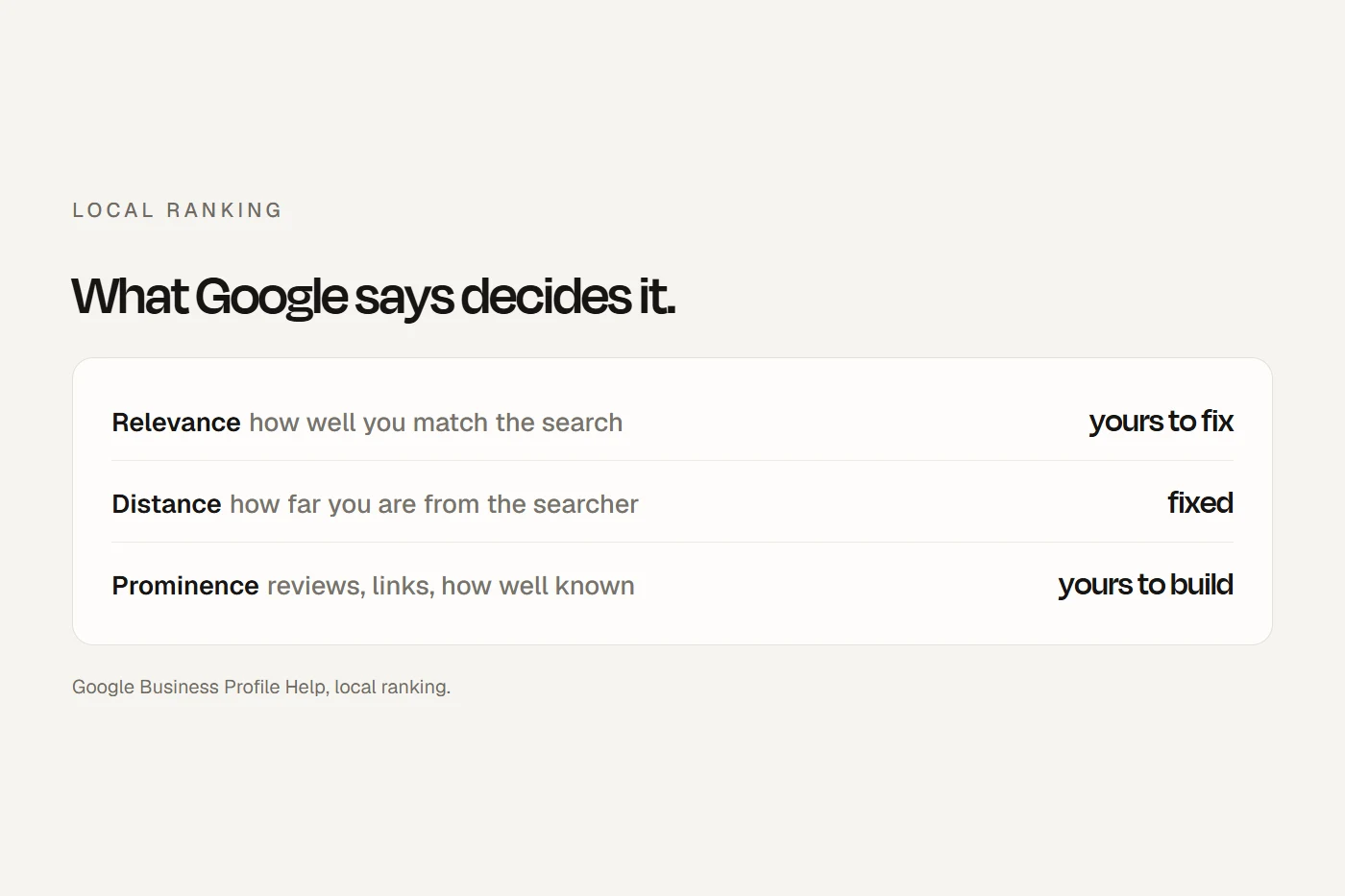
Google names three things: relevance (how well your profile matches what someone searched), distance (how far you are from them, or from the place they typed) and prominence (how well known you are). Under prominence, Google mentions "how many websites link to your business and how many reviews you have", and says "More reviews and positive ratings can help your business's local ranking."
You can't change distance. That's why a business two suburbs away can outrank you for a search made outside its door, and why no one can honestly promise you the top spot across a whole city. Everything else in this guide is about relevance and prominence.
On the same page, Google lists what it wants you to do: verify your business, keep your details complete and accurate, respond to reviews, and add photos. That's the list. It doesn't mention posting every week, stuffing keywords into your description, or buying directory listings.
What to fix first
Some profile problems don't just hold you back; they get the profile suspended. Answer these ten questions and I'll list what to fix, in the order I'd fix it.
Your Business Profile, field by field
A Business Profile is free. Google says only businesses that make "in-person contact with customers during its stated hours" qualify, so online-only businesses and virtual offices are out.
Name
Your name "should reflect your business' real-world name, as used consistently on your shopfront, website, stationery". No suburb, no services, no taglines, no phone number. "Pty Ltd" only if it's on your sign. You'll see plenty of profiles that break this. Even the map for "local SEO Australia" shows agencies with a city and "Local SEO" in their names. Some of them rank for now, but Google's guideline says extra words "could result in the suspension" of the profile.
Category
This is the one field Google explicitly ties to ranking. Pick the most specific primary category on Google's list ("instead of 'Salon', choose 'Nail salon'"). You can add up to nine more, but Google says to "Use as few categories as possible" and to pick ones that complete "This business IS a", not "HAS a". Changing categories can trigger re-verification, so do it once and properly.
Address or service area
If customers come to you, show your address, and keep permanent signage with your name at it. If you go to them and work from home, Google's rule is that you "must hide your business address" and set a service area instead: up to 20 suburbs, postcodes or regions, no more than about two hours' drive from your base, and not a radius. A hybrid business, such as a café that delivers, shows its address and adds a service area.
Hours
List your regular customer-facing hours, and set special hours for public holidays. Google says it's worth confirming holiday hours "even if they're the same as your regular hours." If you're closing for a week or more, mark the business temporarily closed instead.
Photos
Google's own minimums: at least three exterior photos, three interior, three of your work, and three of your team. JPG or PNG, ideally 720 by 720 pixels, "in focus and well lit", with no heavy filters or AI. Photos only show once you're verified.
Services and description
Add your services from Google's suggestions, or as custom services with a short description. A service "may be highlighted on your profile" when someone searches for it. Your description can run to 750 characters: what you offer, what makes you different, how long you've been going. No links, no prices, no specials.
Attributes, booking links and the rest
- Attributes such as wheelchair access or "Women-owned": "your business might show up in searches for places with those attributes." Only tick ones that are true; Google's accessibility definitions are specific.
- Booking link: add your booking page and set it as "Business preferred". Google wants a page dedicated to your business, not a social media page or a link shortener.
- Posts archive after six months unless you set dates. They're fine for news; they're not a ranking lever.
- Questions and answers: Google now shows these only for "select business categories and regions". I wouldn't spend time on them.
- Phone number: your own, which Google says "must be under the direct control of the business". You can add two more.
Verification
Google picks the method: phone, text, email, a live video call or a postcard. If video is offered, Google recommends it. The video must be live, unedited, at least 30 seconds, filmed on a phone, and show where you are (street signs, the building number), that the business is real (your name on a permanent sign, or for a tradie, branded tools or a van), and that you run it (opening the till or the storeroom, or unlocking a branded van). No other people's faces. Postcard codes usually arrive within 14 days and expire after 30. "Google will never ask for your verification code."
How complete is yours?
Tick what your profile has. Google publishes no weights, so I've weighted each item by how strongly Google words it: things Google says affect ranking or showing up count three times, things it lists as tips count twice, and things that only help customers count once. Your ticks save in this browser.
- Verified. "so it's more likely to show up in search results"
- Primary category is the most specific true one. "affect your local ranking"
- Address or service area complete and accurate. "complete and accurate info"
- Regular hours set.
- Special hours set for the next public holiday.
- New reviews in the last month. "More reviews and positive ratings can help"
- Replies to recent reviews. "Respond to reviews" is on Google's ranking page.
- At least three photos each of the outside, inside, your work and your team.
- Attributes that are true for you.
- Your own phone number. "This can improve your business's visibility"
- Additional categories, only true ones.
- Services listed, with descriptions.
- A description, up to 750 characters, no links or specials.
- A link to your own website.
- A booking link set as "Business preferred".
- A post in the last six months.
- Logo and cover photo.
- Opening date.
Your profile also has a built-in check called profile strength, once it's verified. It shows what's missing, but Google doesn't publish how it scores.
Reviews: asking the right way
Reviews feed prominence, and Google's rules on asking for them are strict. Under Google's policy, a business must not:
- offer anything in return: money, discounts, free goods or services;
- ask only happy customers, or discourage negative reviews;
- pressure people to review while they're still on the premises;
- ask for specific content in the review;
- since April 2026, set staff a target number of reviews, or ask for reviews that name a staff member.
What Google does allow: asking customers to share "a genuine experience", without incentives or steering. The ACCC's rules apply on top: fake reviews, and arranging them, are against the law. Where Google and the ACCC differ on incentives, follow Google, which bans them outright.
If you're a registered health practitioner, Ahpra's rules add another layer. My guide on whether clinics can ask for Google reviews covers it.
Write your review request
Fill this in and copy it. It sends the same neutral message to everyone, which is exactly what Google's policy asks for. Get your review link from the "Ask for reviews" option on your profile.
Already have a message you send? Paste it here and I'll flag anything that breaks Google's rules.
Replying to reviews
Google's advice is short: keep replies short, be "a friend, not a salesperson", never share the reviewer's private information, and sign with your name or initials. You don't have to thank every reviewer. My advice for a negative one: reply once, calmly, and take the detail offline. If you suddenly get a run of one- and two-star reviews followed by someone demanding money to remove them, that's an extortion scam: don't engage or pay, and report it through Google's extortion form.
Directories and "citations"
Much local SEO advice is about "citations" and "NAP consistency": your name, address and phone the same everywhere online. It's worth knowing where that idea comes from. Google's ranking page never uses either word. What Google does say is that it builds profiles partly from "crawled web content" and "Licensed data from third parties", so an old wrong phone number on a directory can end up on your profile. Bing is more direct: it recommends "keeping your business name, address, phone number, website, and other key details consistent".
The ranking survey most agencies cite, Whitespark's 2026 Local Search Ranking Factors, asks 47 local SEO experts to rank 187 factors. They put citation consistency 28th for the map and say citations "lost about half a percentage point" of weight, "continuing the downward trend". Whitespark sells citation building, so that's an honest admission. The experts' top three are your primary category, how close you are to the searcher, and keywords in your business name. That last one is the one Google's rules forbid you to add.
So skip the "submit to 100 directories" packages. Fix the handful people actually use:
| Listing | Why | Cost |
|---|---|---|
| Google Business Profile | The map and the local results | Free |
| Apple Business | Apple Maps, Siri and Safari on every iPhone | Free |
| Bing Places for Business | Bing and Microsoft Copilot; can import your Google profile | Free |
| Facebook Page | Where many people check you out | Free |
| Yellow Pages Online | A long-running general directory; the same company runs True Local | Free basic listing |
| Your industry's register | Such as healthdirect's National Health Services Directory, or your law society's | Usually free |
Scroll the table sideways to see every column.
Use the same name, address and number on all of them, and on your website. Be wary of letters and calls that look like directory renewals: Scamwatch has long warned about invoices for listings nobody ordered.
Your website's part
Your profile tells Google who you are and where. Your website tells it what you do, in enough detail to match the searches people make. Three things matter most.
A page for each service
If you offer emergency plumbing, hot water systems and blocked drains, each deserves its own page saying what you do, for whom, roughly what it costs and how to book. Google's Starter Guide says compelling, useful content will likely influence your presence in search "more than any of the other suggestions" in it. Give each page its own title: Google suggests the title could include your business name and "the physical location of the business".
Location pages, not doorway pages
A page for each place you really work from is fine. What Google's spam policy calls "doorway abuse" is "Having multiple domain names or pages targeted at specific regions or cities that funnel users to one page" and "Creating substantially similar pages". A block of sixty suburb names at the bottom of every page is also on Google's list, as keyword stuffing.
The ACCC takes fake local presence seriously too. In December 2024 an online florist was penalised by the Federal Court after admitting it had represented itself as a local florist in towns named across 156 websites and 7,462 Google ads, when it didn't run local shopfronts. The ACCC's warning applies to everyone: claims "about the location of their business, must be accurate".
So: one page per real location, one page per service, and a plain sentence for customers listing the areas you cover.
Structured data
LocalBusiness markup tells Google your name, address, hours and type in a format it reads directly. Google requires only your name and address, and asks for the most specific type, such as Electrician or Dentist. One change worth knowing: Google now says star-rating markup for local businesses is only for sites that review other businesses. Marking up your own reviews won't get you stars.
Measuring it
Your profile's Performance page shows the searches people used to find you, views, direction requests, website clicks, calls, messages and bookings. It only works on verified profiles, and it includes clicks from Google Ads if you run them. You can now link your profile to Google Analytics as well, and Search Console shows which searches brought people to your website.
Two things to know. First, Google's Calls figure is "the number of times a customer clicked on the call button". It doesn't count people who read your number and dial it, or tell you who answered. That gap is why every bdog website plan includes counted calls. If you count calls with a separate number, keep your real number on the profile as well, make sure you own the counting number, and keep your website and directories on your real number.
Second, add tags to the website link on your profile, so visits from the map show up separately in Google Analytics. A common pattern is ?utm_source=google&utm_medium=organic&utm_campaign=gbp. Google's links policy wants the page to load normally, so no link shorteners.
Real Google, or a scam?
Business owners get a lot of calls "from Google". Some are real. Tap each one.
The test is simple: Google never asks for money, codes or passwords over the phone. If in doubt, hang up and log in to your profile yourself.
What local SEO costs
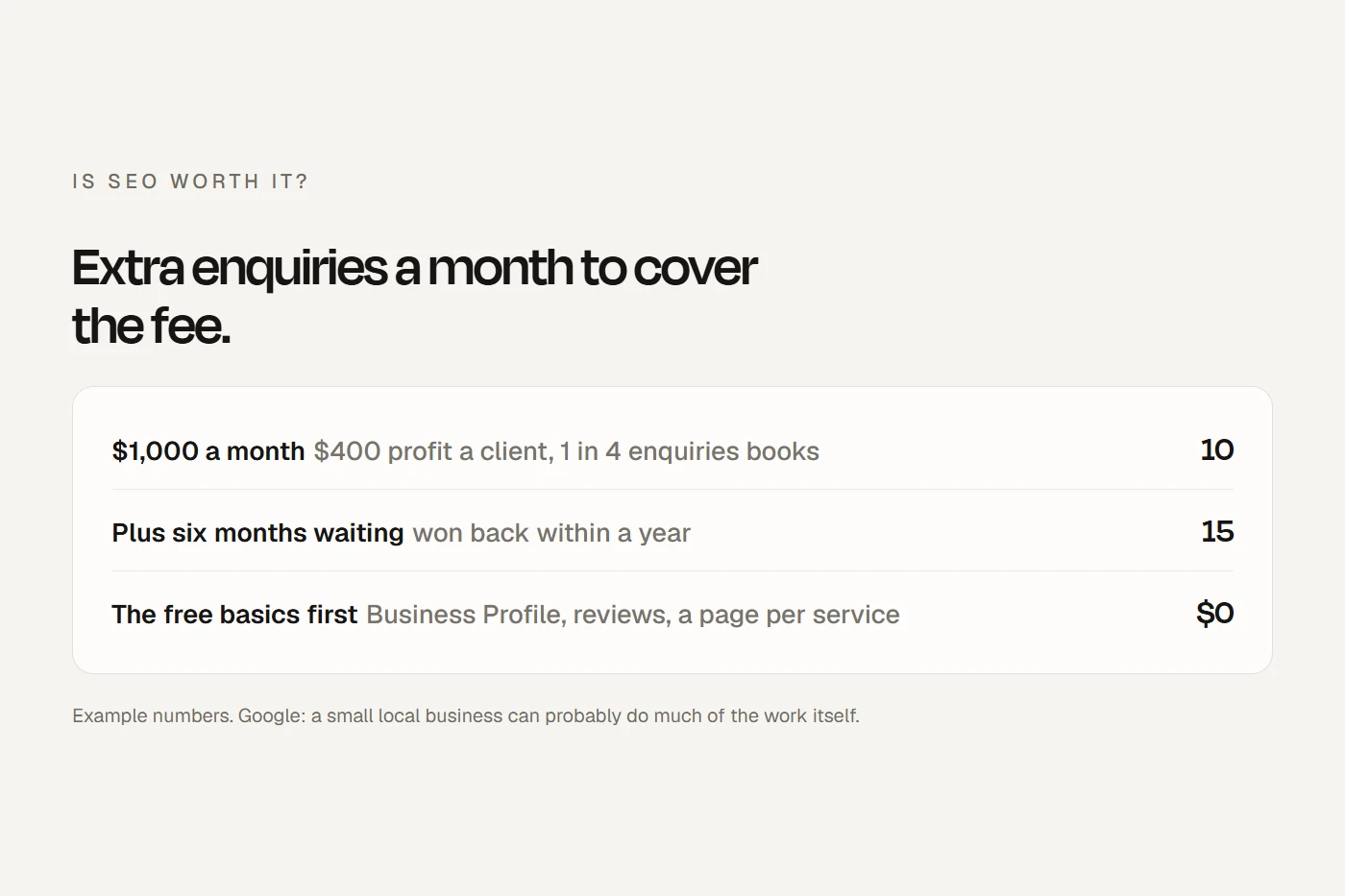
Doing it yourself costs your time. Google's own view is that a small business can "probably do much of the work yourself", and almost everything above is free.
If you pay someone, the price ranges you'll see in Google's AI answer, anywhere from about $500 to $5,000 a month, come from agency blogs. I couldn't find an independent survey of Australian prices. Our Marketing plan is from $500 a month +GST, quoted after a call, and covers your Google Business Profile, website SEO and ads, with ad spend separate. Whoever you hire, Google's rule for them is clear: they must never claim your profile without your consent, and must hand ownership back "immediately upon request". Make sure you're an owner on your own profile. My guide is SEO worth it covers what to ask before you sign.
My view
If I had one afternoon to spend on a local business's SEO, I'd spend it on the profile: name, category, hours, photos, services, and a review request that goes to every customer. If I had a week, I'd add a proper page for each service. Most of what's sold as local SEO beyond that is either the same work done for you, which is fine if you'd rather not do it, or busywork that Google's own pages don't mention.
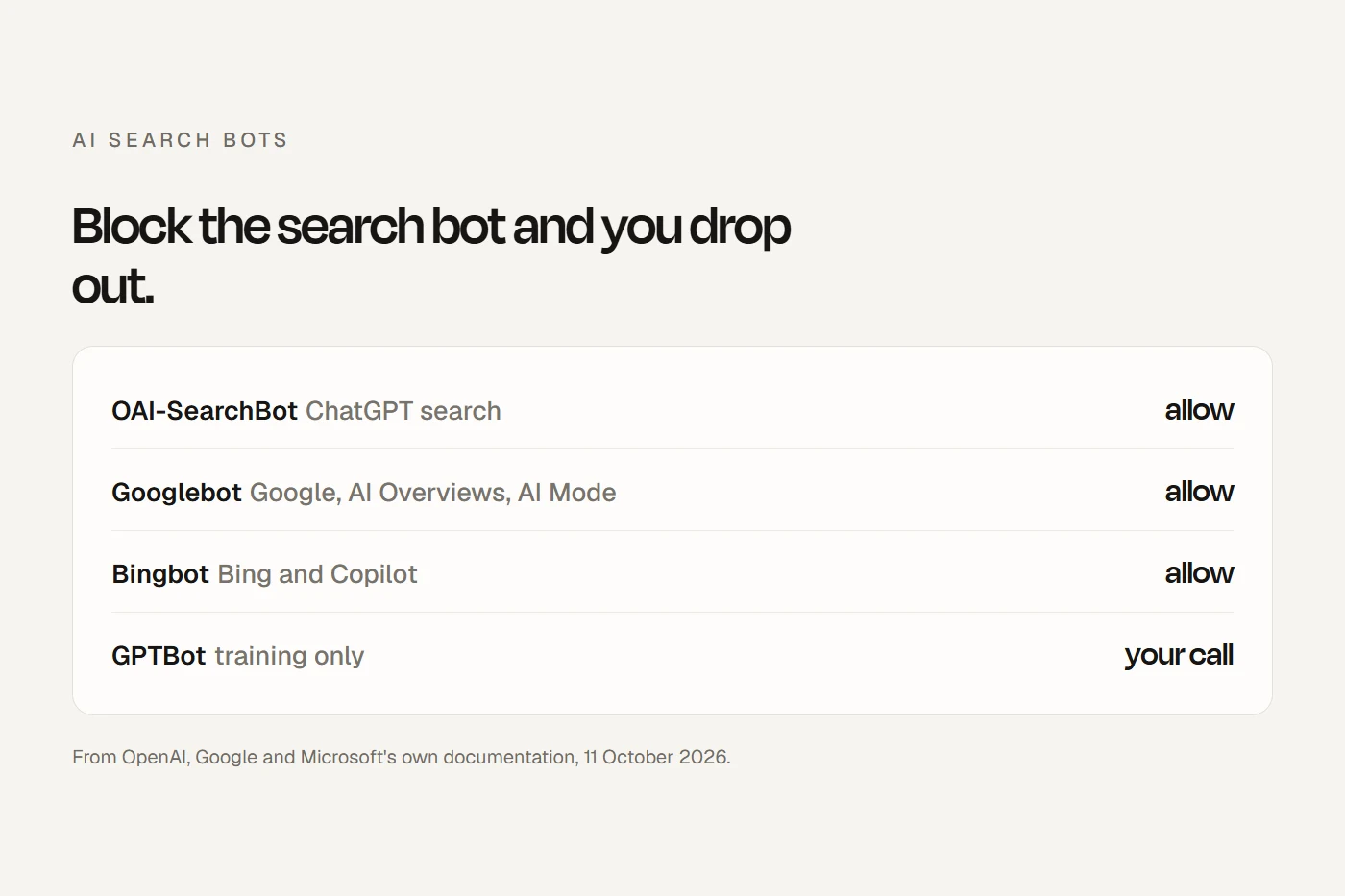
AI answers draw on the same sources. Google says a Business Profile helps you show in "AI responses and other Google Search results", and Copilot runs on Bing's data. More in AI search for local businesses.
Questions I get asked
Can I do local SEO myself?
Yes. The profile, reviews and service pages are all things you can do yourself, and Google's tools are free. Google says you can "probably do much of the work yourself".
How much does local SEO cost in Australia?
Doing it yourself is free. Agencies commonly quote from about $500 a month upwards; I couldn't find an independent price survey. Our Marketing plan is from $500 a month +GST, quoted after a call.
Can I pay Google to rank higher on Maps?
No. Google says "There's no way to request or pay for a better local ranking on Google." Ads can appear above the map, but they're labelled as ads and don't change your ranking.
Should I put my suburb in my business name on Google?
Only if it's part of your real name, on your sign. Adding locations or services to the name breaks Google's rules and can get the profile suspended.
Do I need a page for every suburb I service?
No. A page for each place you actually work from is fine; near-identical suburb pages are "doorway abuse" in Google's spam policy. List the areas you cover in a sentence.
How do I get more Google reviews?
Ask every customer, the same way, after the visit, with your review link. Offer nothing in return, and don't ask them to mention anything or anyone.
Why did my Google Business Profile get suspended?
Common reasons are extra words in the name, a PO box or virtual office address, duplicate profiles, or a home address showing for a service-area business. Google's appeals tool shows the reason; don't create a new profile while you appeal.
About this guide
Written by Joseph Alzein, founder of bdog. bdog builds websites for Australian businesses and sells marketing, including local SEO. Every rule here comes from Google's Australian help pages, Google Search Central, the ACCC, Bing and Apple, read from Sydney on 11 October 2026. The expert survey figures are opinion, published by a company that sells local SEO tools, and are labelled as such.
Main sources:
- Google: tips to improve your local ranking
- Google: guidelines for representing your business
- Google: manage your business category
- Google: service areas
- Google: video verification
- Google: prohibited and restricted content (reviews)
- Google: tips to get more reviews
- Google: Business Profile performance
- Google: help protect your Business Profile
- Google: spam policies
- Google: local business structured data
- ACCC: online reviews
- ACCC: online florist's misleading local representations
- Whitespark: 2026 Local Search Ranking Factors
- Apple: introducing Apple Business