Website accessibility for Australian businesses: the DDA and WCAG
Why the Disability Discrimination Act covers a plumber’s, a shop’s and a cafe’s website, the WCAG 2.2 AA benchmark, why your builder and widgets don’t take the responsibility, where small business sites fail, and how a complaint works. With a 20-point self-check, contrast examples and a 90-day plan.
On This Page
- Who you’re building for
- Why the law applies to your website
- The standard: WCAG 2.2 AA
- You can’t contract it out
- Accessibility widgets and overlays
- Where small business sites fail
- Can a customer use your site? A self-check
- How a complaint actually works
- Your 30, 60 and 90 days
- Does this apply to me?
- Questions I get asked
Most Australian small business owners have never been told their website has to work for people with disability, and most of what you'll find online about it is written by overseas widget sellers or mixes up government rules with business ones. Here's the plain version. The Disability Discrimination Act applies to your website whether you're a plumber, a shop, a cafe or an accountant. The Australian Human Rights Commission says the benchmark is WCAG 2.2 Level AA. And no plugin does it for you. This guide covers who's covered, what the standard asks, the failures small business sites have most, how a complaint actually works, and a self-check you can run without any software. It's general information, not legal advice. Run a clinic? The health version covers booking widgets and intake forms.
- It applies to youThe Act covers anyone who provides goods or services, paid or not, and names trades and refreshment. There's no small business exemption.
- WCAG 2.2 AA is the benchmarkWCAG isn't the law; the Act is. The Commission says WCAG 2.2 Level AA is the minimum it expects.
- You can't hand it offNot to Wix, Shopify or an ordering app, and not to an accessibility widget. The Commission says you can't contract out the responsibility.
Who you're building for
The Bureau of Statistics' latest disability survey found about one Australian in five has a disability, and more than half of people over 65. It's broader than blindness: arthritis makes small buttons hard to tap, hearing loss makes uncaptioned video useless, and mental health and learning conditions make confusing forms a dead end. Many more people use screen magnifiers, captions or a keyboard because of an injury, tiredness or bright sun on a phone.
Most sites fail somewhere. WebAIM, a US non-profit, scans the world's top million home pages every year, and almost all of them have detectable failures of the standard. The same six problems account for nearly all the errors it finds: low-contrast text, images without text descriptions, form fields without labels, links and buttons with no words, and pages that don't declare their language. Australian sites in that scan do no better than the global average.
Why the law applies to your website
Section 24 of the Disability Discrimination Act makes it unlawful for anyone who provides goods or services, "whether for payment or not", to discriminate because of disability, including in "the manner in which" they provide them. The Act's definition of services names "any profession or trade" and "entertainment, recreation or refreshment". That's your electrician, your accountant and your cafe.
A website is a service. The Commission decided that in 2000, in a complaint by a blind man who couldn't use the Sydney Olympics website, and it's still the decision the Commission's guidelines rely on. It applies even if your site is free information and you don't sell anything online.
There's no exemption for small businesses. Size only matters inside a defence: you don't have to do something that would cause "unjustifiable hardship", weighed against things like the benefit to customers and your financial circumstances. But it's your job to prove it, and the Commission's guidelines say the defence is harder to make out now that accessibility standards have existed for decades and mainstream tools support them. State and territory anti-discrimination laws cover the same ground.
The standard: WCAG 2.2 AA
The Commission's current guidelines on equal access to digital goods and services say: "Organisations should conform with WCAG 2.2 at a minimum Level AA". WCAG is the international Web Content Accessibility Guidelines, published by the W3C. The guidelines aren't legally binding, and the Commission is frank that following them may not protect you on its own, but they're the benchmark any complaint will be measured against.
The guidelines name the things small businesses use every day as digital services: websites and online shops, emails and attachments, CAPTCHAs, payment systems, QR codes, maps, and chatbots. They say a person with disability should be able to complete an online purchase from browsing to delivery updates.
You'll see older versions quoted online, and some pages describe government rules as if they applied to you. The Digital Service Standard and the state government accessibility policies bind government agencies, not private businesses. WCAG 3 is an incomplete draft that's years from finished, and the W3C says the best way to prepare is to meet WCAG 2.2 now.
You can't contract it out
This is the line most owners haven't heard. The Commission's guidelines say organisations "can contract out the provision of digital goods or services but they cannot contract out their equal access responsibilities". Your website builder, your online ordering app, your booking system, your chat widget and your cookie banner are all still your service.
The builders say much the same thing in their own words. Wix says it has done the coding but "you are responsible for making sure the content and design are also accessible". Squarespace says you're responsible for your site's legal compliance and mentions only American and European law. WordPress says its "accessibility-ready" theme label "does not mean that the theme meets the WCAG guidelines AA-level". Shopify says following its guidelines "doesn't guarantee that your online store is fully accessible". Your photos, colours, words, PDFs and every app you add are yours.
What to do about third parties: ask each vendor for its accessibility conformance report, sometimes called a VPAT. The Commission says a vendor that's "working towards" accessibility should give you a roadmap with dates, and a vendor reluctant to make any guarantee "should serve as a warning". Until a tool is fixed, offer a genuinely equal alternative, such as a phone number and a person who'll take the order, and say so on the page.
Accessibility widgets and overlays
You'll see ads for one-line plugins that promise compliance. The Commission's guidelines say AI tools, including overlays, "should not be relied upon to enable equal access", and that they aren't yet reliable in most situations. OZeWAI, the Australian association of accessibility professionals, says "No overlay product ensures full compliance". The US consumer regulator took action against one overlay maker over exactly that claim. Fix the site instead, and don't put "fully WCAG compliant" or an overlay's badge on your site unless it's true, because that's a claim about your service.
Where small business sites fail
| What | The usual failure | WCAG 2.2 criterion |
|---|---|---|
| Brand colours | White text on bright orange or light green, light grey body text, text over photos | 1.4.3 Contrast (Minimum) |
| Menus, specials, price lists | Posted only as an image, a Canva tile or a PDF | 1.4.5 Images of Text |
| Photos | No description, or "IMG_2041.jpg" | 1.1.1 Non-text Content |
| Icons | Phone, social, cart and menu icons with no words for screen readers | 2.4.4 Link Purpose (In Context) |
| Quote and enquiry forms | Grey placeholder text instead of labels, vague error messages | 3.3.2 Labels or Instructions; 3.3.1 Error Identification |
| Sliders and video backgrounds | Autoplay with no pause button | 2.2.2 Pause, Stop, Hide |
| Sticky headers, cookie bars, chat bubbles | Cover the button you're on, or can't be closed by keyboard | 2.4.11 Focus Not Obscured (Minimum); 2.1.1 Keyboard |
| Small buttons on phones | Close X, quantity and social icons too small or too close together | 2.5.8 Target Size (Minimum) |
| Ordering, booking, checkout | Can't be finished by keyboard, or a timer runs out with no warning | Conformance requirement for complete processes; 2.2.1 Timing Adjustable |
| CAPTCHAs and log-ins | Puzzles, and portals that block password managers or pasting | 3.3.8 Accessible Authentication (Minimum), for log-ins |
| Videos and reels | No captions, or unchecked auto-captions | 1.2.2 Captions (Prerecorded) |
| Maps | Address, parking and access shown only in an embedded map | 1.1.1 Non-text Content |
Scroll the table sideways to see every column.
Two of these trip up businesses that think they're fine. WCAG counts a process as one unit, so a beautiful homepage with a checkout or booking flow that can't be finished doesn't conform. And the Commission says PDFs can't be made fully accessible, especially on phones, so put your menu, price list and hours on the page as text and keep the PDF as an extra, if at all.
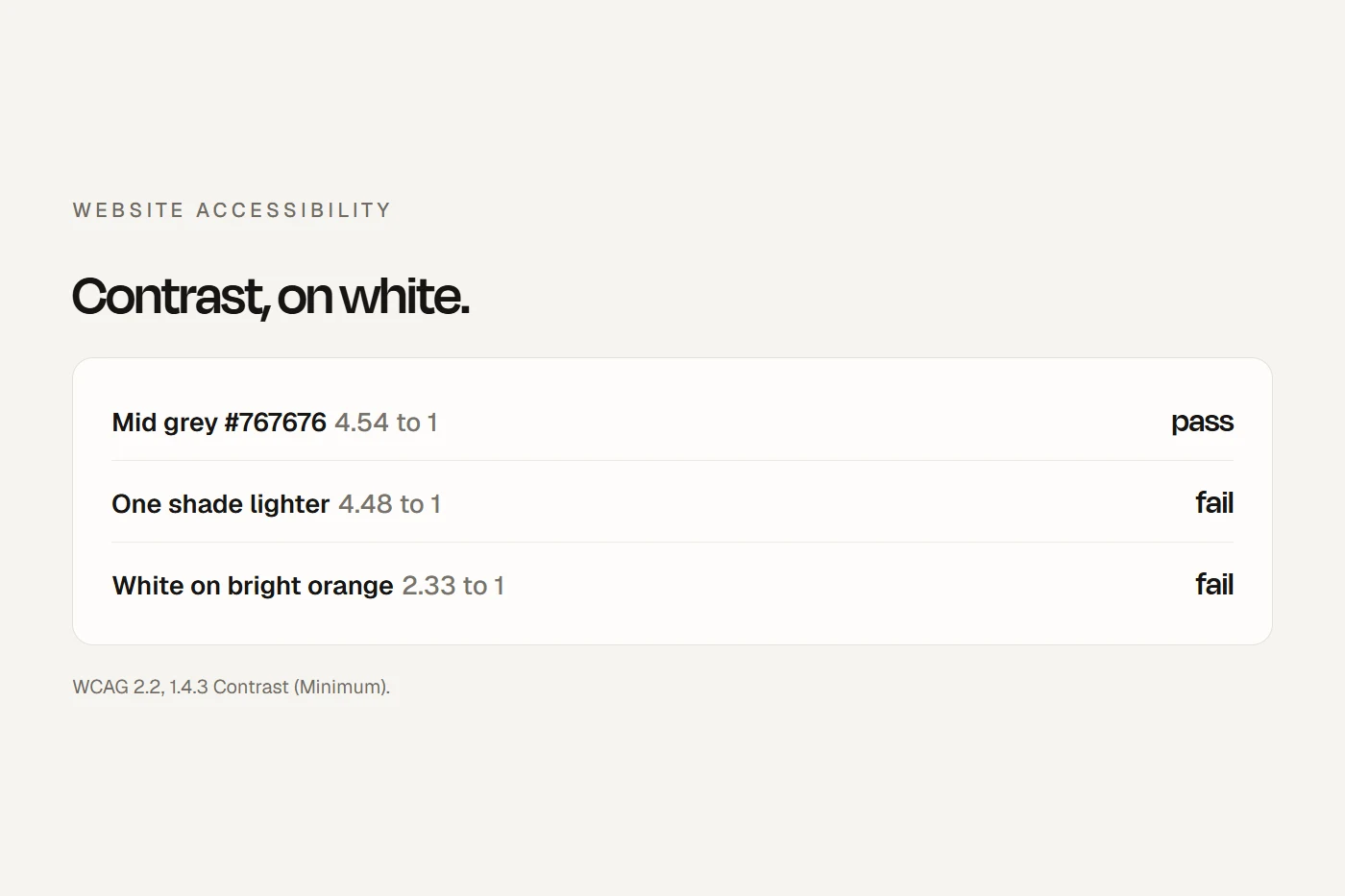
Contrast in numbers. Normal text needs a contrast ratio of at least 4.5 to 1 against its background; large text and buttons need 3 to 1. Logos are exempt. Some illustrative colours on a white background, worked out with the W3C's formula:
| Colours | Ratio | Normal text | Large text |
|---|---|---|---|
| Mid grey #767676 on white | 4.54 | Pass | Pass |
| One shade lighter, #777777 on white | 4.48 | Fail | Pass |
| Light grey #999999 on white | 2.85 | Fail | Fail |
| White on bright orange #FF8C00 | 2.33 | Fail | Fail |
| White on bright green #25D366 | 1.98 | Fail | Fail |
| White on red #E53935 | 4.23 | Fail | Pass |
| White on mid blue #0070C0 | 5.15 | Pass | Pass |
| White on dark green #2E7D32 | 5.13 | Pass | Pass |
Scroll the table sideways to see every column.
Free contrast checkers let you paste your own two colours. If your brand colour fails, keep it for the logo and backgrounds and use a darker shade for text and buttons.
Writing alt text. If an image is a link or button, describe what it does ("Call us"), not what it looks like. If it's pure decoration, mark it decorative. If it has words in it, put the words on the page. Otherwise, describe what a customer needs in one sentence: not "Food" but "Smashed avocado on sourdough with poached egg"; not "IMG_2041.jpg" but "Bathroom after renovation: walk-in shower with frameless glass and grey floor tiles".
Can a customer use your site? A self-check
No software needed. Tick each one that passes; the list remembers your progress on this device. Passing all of them doesn't make a site compliant, the W3C is clear that a page can pass simple checks and still have barriers, but failing any of them means real customers are stuck.
- Phone: read the homepage at arm's length Nothing runs off the side, no sideways scrolling. (1.4.10 Reflow)
- Computer: zoom the browser to 200% The menu, phone number and main button still show and work. (1.4.4 Resize Text)
- Put the mouse away and press Tab from the top You can always see where you are. (2.4.7 Focus Visible)
- Keep tabbing through the menu, cookie banner and main button You reach everything, Enter works, nothing traps you. (2.1.1 Keyboard; 2.1.2 No Keyboard Trap)
- Watch the sticky header, cookie bar and chat bubble while tabbing The highlighted item is never fully hidden. (2.4.11 Focus Not Obscured)
- Check light grey text, text on photos and white on your brand colour 4.5 to 1 or better for normal text. (1.4.3 Contrast)
- Open your builder's settings for five images Each has a useful description or is marked decorative. (1.1.1 Non-text Content)
- Menu, price list or special only as a picture or PDF? The words are also on the page as text. (1.4.5 Images of Text)
- Read your links and buttons out of context No "click here", "read more" or icon-only buttons. (2.4.4 Link Purpose)
- Click into each form field A label stays visible, not just grey placeholder text. (3.3.2 Labels or Instructions)
- Submit a form with a bad email address The page says which field and what's wrong, in words. (3.3.1 Error Identification)
- Anything moving by itself for more than five seconds? There's a visible pause or stop button. (2.2.2 Pause, Stop, Hide)
- Any sound playing on its own? No, or it stops within three seconds, or can be paused. (1.4.2 Audio Control)
- Videos with speech Have captions you've checked. (1.2.2 Captions)
- A puzzle CAPTCHA on a form or log-in? No, or there's another way that isn't a puzzle. (3.3.8 Accessible Authentication)
- Tap your smallest buttons on a phone Easy to hit without hitting the one next to it. (2.5.8 Target Size)
- Phone number and email In the same place on every page. (3.2.6 Consistent Help)
- Book, order or check out start to finish by keyboard You can finish, and any timer warns you and lets you extend. (Complete processes; 2.2.1 Timing Adjustable)
- An accessibility widget or icon on your site? Removed, or you know it isn't the fix.
- A way to tell you there's a problem, and another way to buy or book Phone and email in the footer and in an accessibility statement.
If you're willing, turn on VoiceOver on an iPhone or Mac, or NVDA on Windows, and try one task. Ten minutes of that teaches more than any scanner.
How a complaint actually works
- It starts at the Commission, not in court. A customer can lodge a written complaint with the Australian Human Rights Commission for free, themselves or through an advocate or lawyer. The Commission tells you and gives you a copy.
- Conciliation. The Commission tries to resolve it informally, by letters, phone or a conference. You don't need a lawyer. It's confidential, and what's said can't be used in court later. Outcomes include an apology, changes to a practice, training or compensation.
- Time. The Commission may decline a complaint lodged more than two years after the events.
- Court only after that. If the complaint is terminated, for example because conciliation failed, the customer has 60 days to apply to the Federal Court or the Federal Circuit and Family Court.
- Costs changed recently. If a customer wins in court, the business must now pay their legal costs. If the business wins, the customer usually doesn't pay the business's costs, with exceptions, including for a respondent without a significant power or resource advantage over the person complaining.
Published conciliation outcomes show what's usually asked for. A blind member of a professional association who couldn't use its website got an apology, a project to fix the site, a say in which parts were fixed first, and a contact person to help in the meantime. An insurer changed its online quote form after a customer with a vision impairment couldn't get a quote. Older outcomes include a utility site with fixed font sizes and poor contrast, online banking security checks, and an airline that let assistance animal bookings be made only by phone. Larger matters, like a blind shopper's case against Coles over its online grocery site, settled with commitments to fix the site.
Your 30, 60 and 90 days
Days 1 to 30: the big six. Run the self-check. Fix contrast, alt text, form labels, link and button text, and the page language setting. Turn off autoplay or add pause buttons. Put menus and price lists on the page as text. Put your phone and email on every page in the same place. Remove any overlay.
Days 31 to 60: the paths that make money. Test quoting, booking, ordering and checkout from start to finish by keyboard and on a phone. Ask each third-party vendor, for booking, ordering, chat, payments and cookies, for its conformance report and a dated fix plan. Where a vendor falls short, set up an equal alternative and say so on the page. Caption your videos.
Days 61 to 90: write it down. Publish an accessibility statement: the standard you aim for (WCAG 2.2 AA), what's known not to work yet, another way to buy or book, and who to contact. The W3C has a free statement generator. Write a one-page action plan covering what you checked, what you fixed, what's left and who's responsible. The Act lets you give an action plan to the Commission, and one you've given counts when the hardship defence is weighed. Then book a test with people who use assistive technology, and check accessibility every time the site changes.
Does this apply to me?
Tap a card to see the answer.
Questions I get asked
Is website accessibility a legal requirement in Australia?
Yes. The Disability Discrimination Act applies to any business providing goods or services, and a website is a service. The Act doesn't name WCAG, but the Australian Human Rights Commission says WCAG 2.2 Level AA is the minimum it expects.
Are small businesses exempt?
No. There's no size exemption. A business can argue that a change would cause unjustifiable hardship, but it has to prove it, and the Commission says that's harder now that accessible tools are mainstream.
Is WCAG 2.1 or 2.2 required?
The Commission's guidelines say WCAG 2.2 at Level AA. You'll see 2.0 and 2.1 quoted on older and government pages, but 2.2 is the current benchmark.
Will an accessibility widget make my site compliant?
No. The Commission says AI tools and overlays shouldn't be relied on, and Australia's accessibility professionals' association says no overlay ensures compliance.
My website builder says it's accessible. Is that enough?
No. Every major builder says your content, design and apps are your responsibility, and the Commission says you can't contract out equal access.
What happens if someone complains?
The Commission tries to resolve it through confidential conciliation, usually with fixes, sometimes an apology or compensation. Only if that fails can it go to court, and the customer must apply within 60 days.
About this guide
Written by Joseph Alzein, founder of bdog. I build websites for Australian small businesses. Sources were checked on 12 October 2026. This is general information, not legal advice. I've left out damages and settlement figures.
Main sources:
- Disability Discrimination Act 1992
- Australian Human Rights Commission Act 1986
- Australian Human Rights Commission: guidelines on equal access to digital goods and services
- Australian Human Rights Commission: disability discrimination complaints
- Australian Human Rights Commission: how conciliation works
- W3C: Web Content Accessibility Guidelines 2.2
- W3C: Easy Checks
- W3C: accessibility statement generator
- W3C: WCAG 3 introduction
- Australian Bureau of Statistics: disability, ageing and carers
- WebAIM Million
- OZeWAI: understanding accessibility widgets
- Wix: accessibility
- WordPress: accessibility
- Shopify: accessibility for themes
- Digital Service Standard, criterion 3 (government)