Xero Practice Manager (XPM): price, Partner Hub and alternatives
What changed when XPM moved into Xero Partner Hub, what it costs at your partner status, how many clients get you to Silver, what it still doesn’t do, which alternatives can lodge with the ATO and where each keeps client data. With a points calculator, a cost calculator, a stay-or-switch quiz and a switching checklist.
On This Page
If you searched "Xero Practice Manager" looking for the login, it's now inside Xero Partner Hub. This guide is for the owner of a small accounting or bookkeeping practice deciding whether to stay on Xero Practice Manager (XPM), move to it, or leave it. It covers what changed with the rename, what it costs at your partner status, how to reach Silver, what it still doesn't do, which alternatives can actually lodge with the ATO, and where each keeps your clients' data. I build accounting firm websites and have no relationship with Xero or any vendor here. Everything comes from Xero's own pages, the ATO's product register, the TPB and the competitors' own pricing.
- Same product, new nameXero says "Xero Practice Manager is now Xero Partner Hub plus Practice Management". The tools are the same, and so is the price.
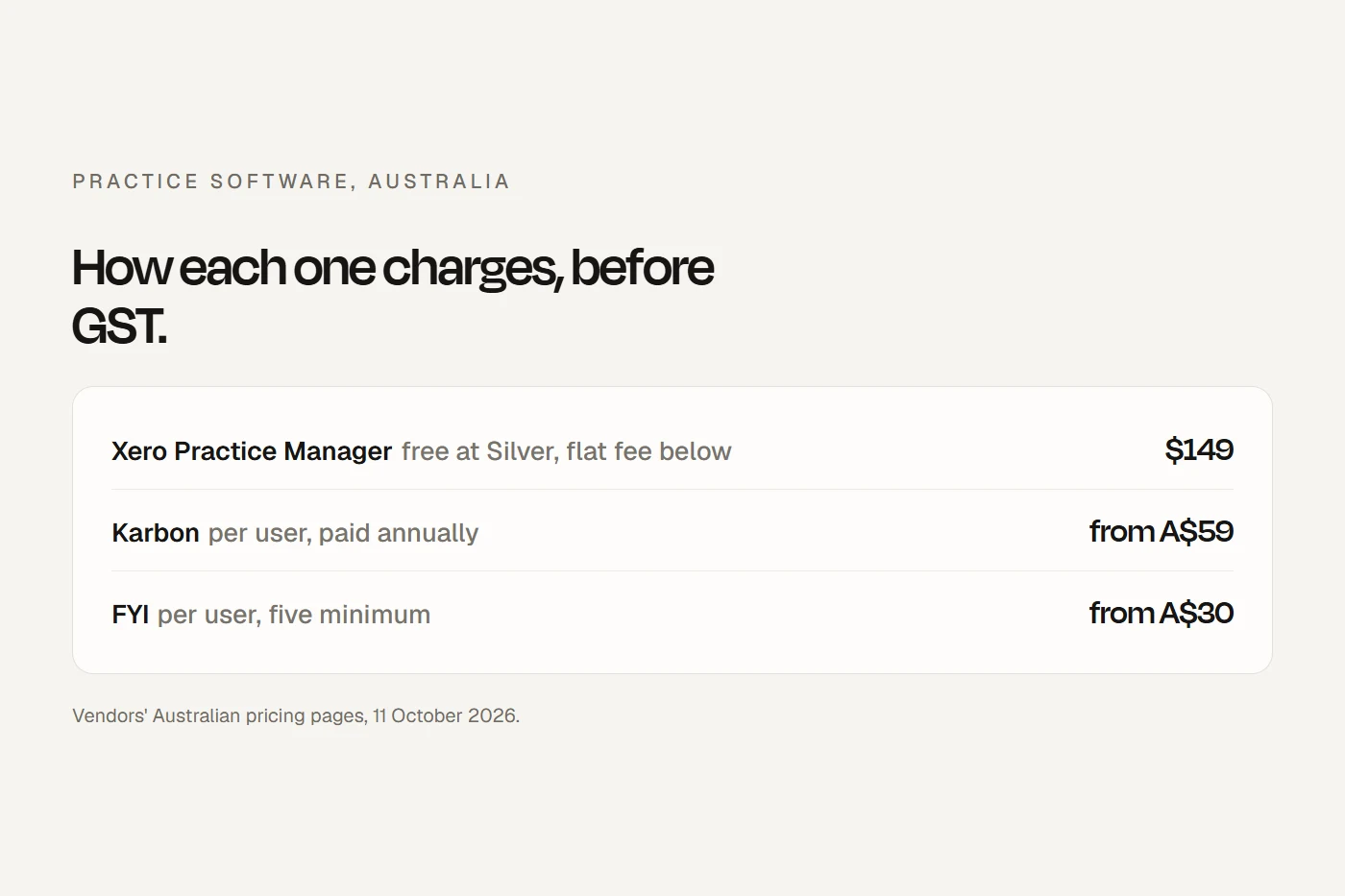
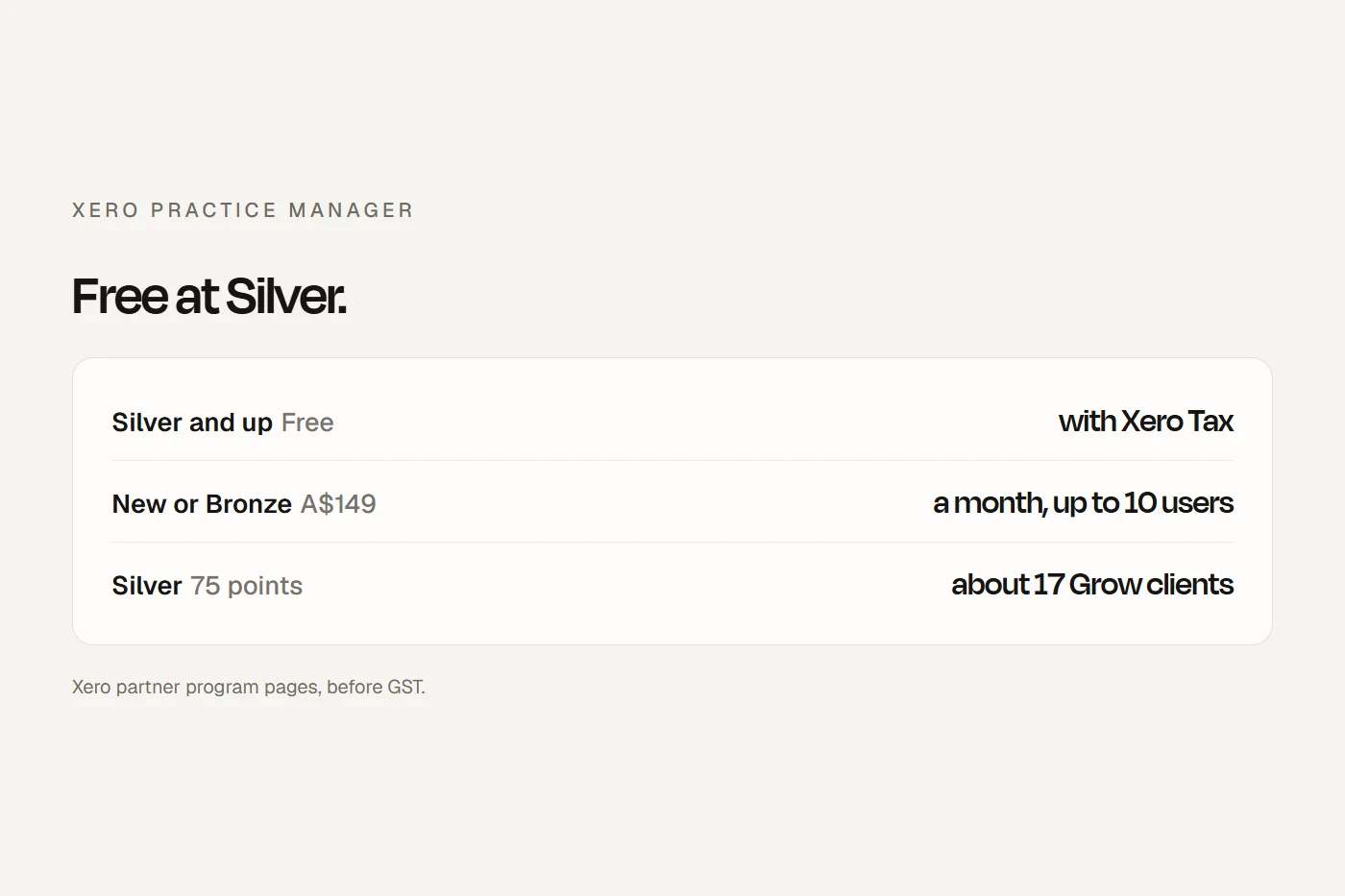
- Free at Silver, flat fee belowFree for Silver, Gold and Platinum partners. New and Bronze practices pay A$163.90 a month including GST for up to ten users, with Xero Tax and Workpapers included.
- Most alternatives can't lodgeKarbon, FYI, TaxDome and Ignition aren't on the ATO's register of software that sends data to the ATO. Leave XPM for one of them and you still need a lodgement product.
What changed
Xero has folded XPM into Xero Partner Hub, alongside Xero Tax, Xero Workpapers and what used to be Xero HQ. Xero says "Everything you use remains the same", practices not already moved are being switched over automatically, and "There are no associated changes to pricing, or the partner program." It's a rename and a new home, not a retirement.
Two new things sit alongside it: a paid Workpapers Plus add-on built with BGL, at A$45 per user with a Workpapers role a month before GST, and AI tools still in beta. Xero also says the Partner Hub work is why some long-requested XPM features aren't planned: on its own ideas forum, a timer pause button, custom relationship types and regular client-to-contact syncing are all marked not in the pipeline.
What it costs
- Silver, Gold or Platinum partners: Practice Management is free, with Xero Tax and Workpapers.
- New or Bronze: a 14-day trial, then A$163.90 a month including GST (A$149 before) for up to ten users. That's a flat fee, not per user. Xero doesn't publish the price above ten users at Bronze.
- Xero Tax and Workpapers on their own are free from Bronze on Xero's Australian pages (one Xero Central article still says Silver, so check your status page). New practices below Bronze pay A$71.50 for one user, A$108.90 for up to three or A$163.90 for four or more, including GST.
- Joining the partner program is free. To reach any status you need at least one staff member with an active Xero certification.
How far are you from Silver?
Silver takes 75 partner points, earned mostly from your clients' Xero subscriptions. Put in your client numbers. This is Xero's points table as published; your Partner Central page has the real count.
About 17 clients on Grow paying Xero directly gets a practice to Silver, at which point XPM costs nothing. For many small practices, moving a handful of clients' subscriptions is the cheapest software decision they'll make.
What XPM does, and doesn't
It does the practice management core: jobs and tasks, time entered by duration or start and stop, work in progress, invoicing at fixed prices or rates, reports, one client record, and sync with your Xero ledger. Xero Tax handles preparation and lodgement for all client types and pre-fills from the ATO.
What it doesn't do on its own, by Xero's own pages:
- No email filing. Client emails stay in inboxes unless you add an app.
- Limited documents. Uploads are capped at 16MB a file, and you can connect only one document system at a time (Box, Dropbox, Google Drive, or SharePoint through SuiteFiles). Changing it means downloading everything and uploading it again yourself.
- No client portal of its own, beyond Xero Ask for document requests and document packs signed with paid Xero Sign bundles.
- API limits: apps connected to XPM work within Xero's limits of 60 calls a minute and 5,000 a day per practice, and FYI says it can't raise them. Bulk moves in or out run over several days.
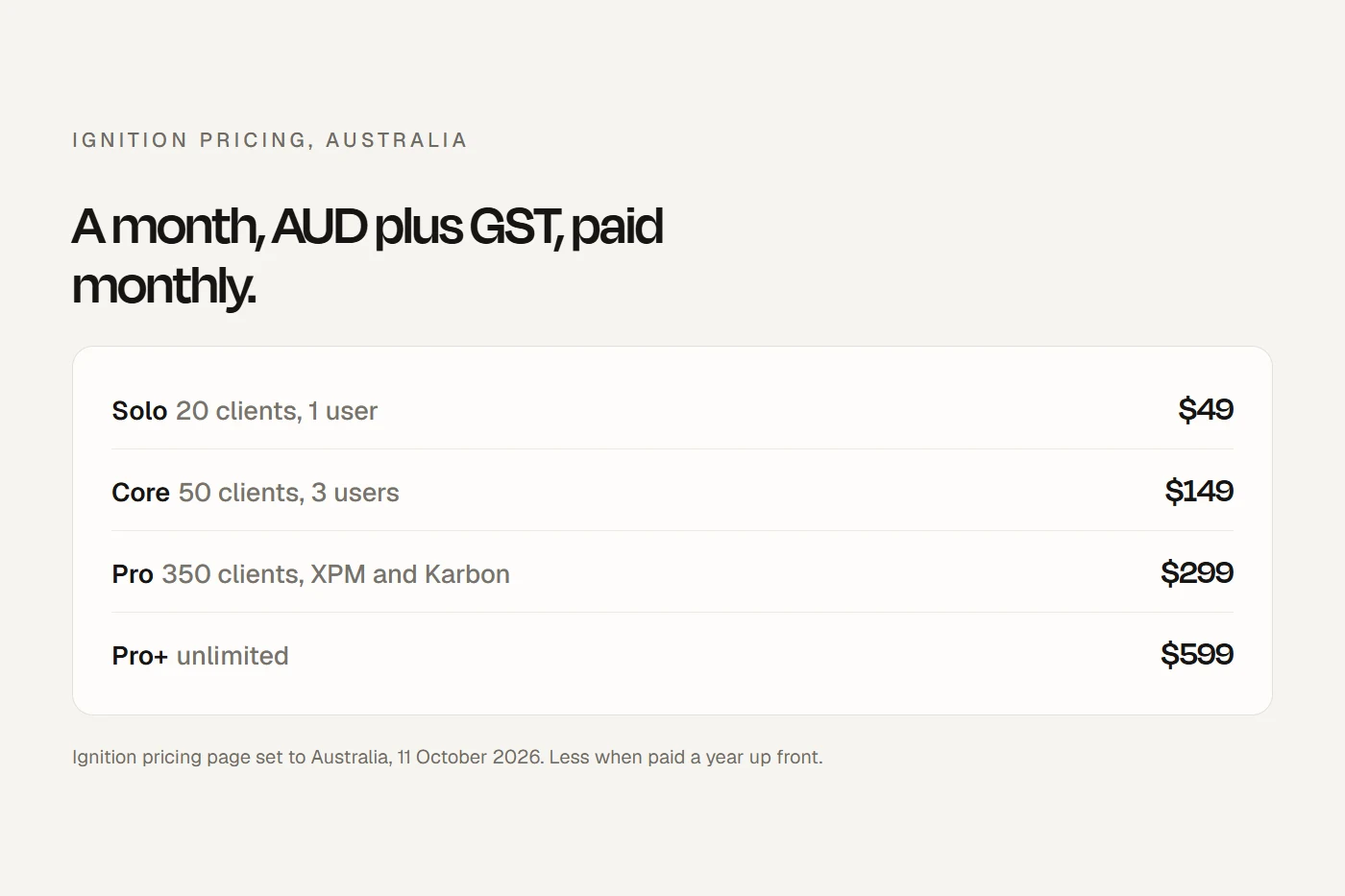
Xero itself points practices to the App Store for "document management, proposal tools, client onboarding". The common stack is XPM with FYI for email and documents on Microsoft 365 and Ignition for proposals and billing; Ignition's XPM link starts on its Pro plan. See my FYI guide and Ignition review.
The alternatives
| XPM | Karbon | FYI | TaxDome | CCH iFirm | MYOB Practice | APS (Access) | |
|---|---|---|---|---|---|---|---|
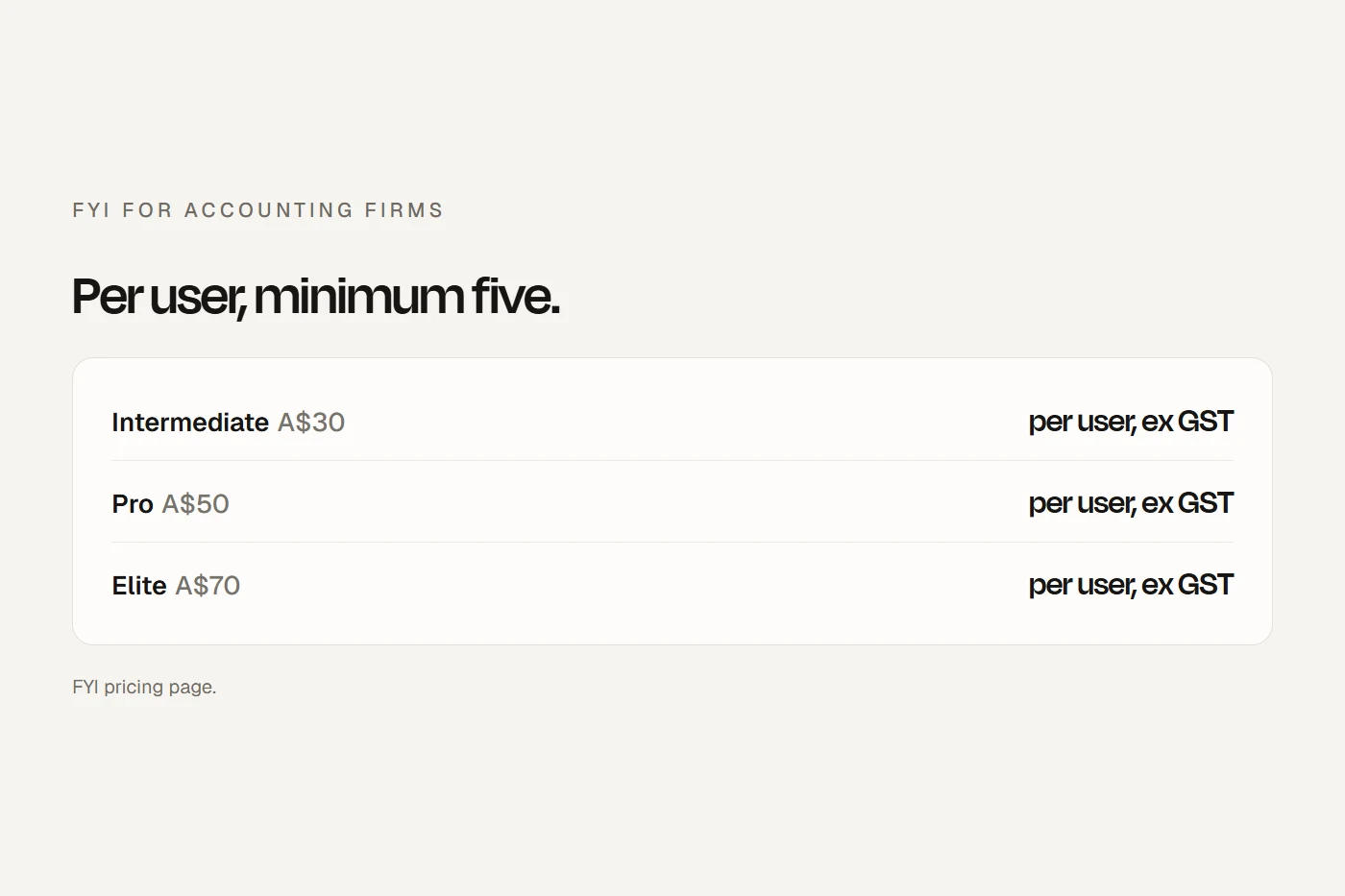
| Published AUD price | Free at Silver; A$163.90 incl GST up to 10 users | A$59 to A$109 per user, before GST | A$30 to A$75 per user, minimum 5, before GST | A$1,300 to A$1,500 per seat a year | Quote | Quote | Quote |
| Jobs, time, WIP, invoicing | Yes | Yes | Elite only | Yes | Yes | Yes | Yes |
| Email filing | No, needs an app | Yes | Yes, Microsoft 365 | Not checked | Yes | Not checked | Not checked |
| Client portal | Requests and document packs | Yes | Pro and Elite | Yes | Yes | Not checked | Not checked |
| Lodges with the ATO | Yes, Xero Tax | No | No | No | Yes | Yes | Yes |
| Data location stated | Australia, New Zealand and the US | Not stated | Sydney | Not stated | Documents in Australia | Not stated | Not stated |
Scroll the table sideways to see every column.
"Lodges with the ATO" means the vendor has a product on the ATO's register of software authorised to send data to the ATO. FYI's Pro and Elite prices are the ones FYI has announced.
- Karbon is the strongest workflow and email alternative, with a client portal and billing in every plan. Monthly billing is only for teams of four or more, and it doesn't name a hosting country.
- CCH iFirm (Wolters Kluwer) and MYOB Practice are the one-vendor suites with their own tax lodgement, sold by quote. MYOB suits practices with many MYOB-ledger clients.
- APS now belongs to the Access Group, which bought it from Reckon, and is aimed mainly at larger firms.
- TaxDome bundles portal, documents, e-signing and billing, priced per seat a year with no GST added, but it has no native Xero link and doesn't lodge.
- US-built tools such as Financial Cents, Jetpack Workflow and Canopy price in US dollars and host in the US, and Canopy is built around the American tax system. Accountancy Manager now redirects to a UK and Ireland product.
What each costs at your size
Before GST, at published prices. Quote-only suites aren't included.
Under ten users at Bronze, XPM's flat fee beats any per-user tool from about three people, and at Silver nothing beats free. The case for leaving is rarely price; it's email, documents and the client portal, which most practices solve by adding apps rather than switching.
The rules your setup has to meet
- Records for five years: the TPB's Code Determination requires registered tax and BAS agents to keep records of their services, including all advice given and received, for at least five years after each service. If you leave a system, keep a readable export for former clients.
- Client permission for the cloud: the TPB's guidance on cloud computing says practitioners must get each client's permission before giving client information to a third party, cloud providers included, and recommends telling clients who and where. The engagement letter is the natural place; update it when you change vendors.
- Overseas data: if the Privacy Act covers your practice, sending data to an overseas provider brings extra obligations. Xero says data may be processed in Australia, New Zealand and the US; some alternatives are US-hosted.
- TFNs: the TFN Rule applies to every practice holding them, whatever its size. Xero has a separate staff permission for viewing tax file numbers; use it.
- Logins: the ATO requires software that connects to it to use multi-factor login and block shared logins. Give every person their own login.
- Anti-money laundering: practices providing designated services under the new AUSTRAC rules need customer checks and record keeping that XPM doesn't provide itself. AUSTRAC has a checker to see whether you're caught.
Stay or switch?
If you do switch
Your ticks save in this browser.
- Check your partner status and points before paying for anything.
- Check the replacement can lodge on the ATO's product register, or keep Xero Tax.
- List every app connected to XPM; each needs reconnecting or replacing.
- Plan bulk moves around Xero's API limits, over several days.
- Export documents first: changing document systems means downloading and re-uploading yourself.
- Keep a readable archive of job notes, advice and documents for at least five years after each service.
- Ask the new vendor where data is stored and backed up, whether it can change the terms, and how you get data back at the end.
- Update your engagement letter to name the new provider and where data is held, and get client permission.
- Multi-factor login for everyone, and no shared logins.
- A TFN plan: where TFNs sit in the new system, who can see them, and secure destruction in the old one.
- Update your website: client portal link, onboarding form and your Xero advisor directory profile.
My view
For a small practice whose clients are mostly on Xero, XPM is hard to beat: it's free at Silver, a flat fee below that, and it comes with lodgement. Its weak spots are email, documents and the client portal, and the cheapest fix is an app on top, not a switch. Leave only if your clients aren't on Xero, if you need one vendor for everything, or if those gaps genuinely cost you more than a new system and a lodgement product would.
Questions I get asked
Is Xero Practice Manager being discontinued?
No. Xero has renamed it Xero Partner Hub plus Practice Management and moved it inside Partner Hub. Xero says the tools, pricing and partner program are unchanged.
How much does Xero Practice Manager cost?
It's free for Silver, Gold and Platinum partners. New and Bronze practices pay A$163.90 a month including GST for up to ten users, with Xero Tax and Workpapers included.
How do I get to Xero Silver partner status?
Silver needs 75 partner points, earned mostly from your clients' Xero subscriptions, plus one staff member with an active Xero certification. About 17 Grow clients billed by Xero gets you there.
What are the best Xero Practice Manager alternatives in Australia?
Karbon for workflow and email, CCH iFirm and MYOB Practice for one-vendor suites with lodgement, and TaxDome for an all-in-one portal. Only the suites can lodge with the ATO themselves.
Where does Xero store practice data?
Xero's privacy notice says data may be processed in Australia, New Zealand and the United States.
About this guide
Written by Joseph Alzein, founder of bdog. bdog builds accounting firm websites and has no relationship with Xero or any vendor here. Prices and features were read from each vendor's own pages; lodgement from the ATO's product register; the rules from the Tax Agent Services Code Determination, the TPB, the Privacy Commissioner, the ATO and AUSTRAC. Sources were checked on 12 October 2026. Prices change, so check before you sign. This is general information, not legal advice.
Main sources:
- Xero: Partner Hub and Practice Management
- Xero Partner Hub
- Xero partner program
- Xero Central: the partner program explained
- Xero Tax
- Xero Workpapers Plus
- Xero Central: document management systems
- Xero developer: API limits
- Xero privacy notice
- ATO: product register
- Karbon pricing
- TaxDome pricing
- Tax Agent Services Code Determination