Squarespace SEO: what it does well and what it leaves to you
Squarespace switches on the technical basics by default and leaves you the content and a few settings. Here are its limits in its own words, what its AI crawler box really blocks, and why it’s slower to respond for Australian visitors.
On This Page
Squarespace is fine for SEO for most small businesses, and I say that as someone who competes with it. It switches on the technical basics by default: a sitemap, clean web addresses, structured data, HTTPS and server-rendered pages. What it leaves to you is the content and a handful of settings, and those are where most Squarespace sites fall short.
There are real limits too, and I'll give you each one in Squarespace's own words. The one that surprised me is speed for Australian visitors: Squarespace pages are quick to respond once they load, but the wait for the server is much longer here than overseas.
- Can a Squarespace site rank?Yes. Google's own help names Squarespace as a host that manages your sitemap for you, and nothing Google has published counts against it.
- What's left to youTitles, descriptions, alt text on images, a redirect every time you change a page address, and connecting Search Console.
- The limitsYou can't edit robots.txt or the built-in structured data, and anything that touches the page's code needs the Core plan or above.
Everything here was checked on 11 October 2026 against Squarespace's help centre, Google's documentation and the HTTP Archive's Chrome data for Australia.
What Google has said
Very little, and nothing negative. Google's Search Console help says "If you're using a web hosting service such as Squarespace or Wix, they probably manage your sitemap for you", in which case you don't need to do anything. Its other documentation doesn't mention Squarespace at all.
In July 2026 Google's John Mueller answered an SEO whose client was on Squarespace and worried about an odd, uneditable link the platform adds. As reported by Search Engine Journal, he said: "It doesn't really matter. I'd ignore it. It has no impact on search / SEO at all." He added that on a hosted platform "there might be nothing you can do", and that's fine.
Squarespace makes a similar point about third-party SEO tools: their results "can be misleading for Squarespace sites". If someone has emailed you an audit listing "blocked by robots.txt" pages or a "/config" warning, those are normal on every Squarespace site. Check Google Search Console before you worry.
The study people quote
In 2019 Ahrefs, an SEO tool company, found 15.1% of Squarespace sites got any search traffic, against 45.5% of WordPress sites. But when it balanced the two samples, Ahrefs wrote that "the results are somewhat inconclusive" and that it couldn't "say whether one CMS is better than the other". It put the gap down to Squarespace attracting "less SEO-savvy people". I haven't found any independent study showing the platform itself holds rankings back.
Myth or fact
Tap a card to see what the evidence says.
What Squarespace does for you
From Squarespace's own help pages. Most SEO settings on version 7.1 sit in the SEO/AI Visibility panel, under SEO Settings. On older 7.0 sites it's the SEO appearance panel.
| What | What Squarespace does | Where |
|---|---|---|
| Sitemap | Writes and updates it at /sitemap.xml, usually within an hour of a change | Automatic, not editable |
| Web addresses | Simple, stable addresses like yoursite.com/about; extra domains redirect to your main one | Pages panel, gear, URL slug |
| Titles and descriptions | Editable per page, with site-wide title formats | Pages panel, gear, SEO tab |
| Canonical tags | Added automatically | No setting |
| Structured data | Blog post, event, local business, organisation, product and website, automatically | Not editable |
| Hiding a page from Google | A "Hide page from search results" switch on most pages | Pages panel, gear, SEO tab |
| Redirects | 301 and 302 redirects, typed one per line | Developer tools, URL mappings |
| Google Search Console | Connects in a few clicks | Analytics, Search keywords, Connect |
| Headings | Heading 1 to 4 become real H1 to H4 tags, in the page Google receives | Text editor |
| AI crawlers | Open by default; one box blocks 26 known AI bots | Settings, Crawlers |
Scroll the table sideways to see every column.
The real limits, in Squarespace's words
| Limit | Squarespace says | Matters to you? |
|---|---|---|
| robots.txt and sitemap | "You can't edit the sitemap or a page's source code." Every site shares one robots.txt. | Rarely. The defaults are sensible. |
| Built-in structured data | "which you can't edit or remove" | Sometimes. It uses the generic local business type rather than a specific one, such as Dentist. |
| Code in the page head | Code injection is "available in the Core, Plus, Advanced, and some legacy billing plans" | Yes on Basic: no custom schema, no hiding the homepage, no verification tags. |
| Changing an address | "traffic won't automatically redirect to the new URL" | Yes. Add a redirect every time. |
| Redirects | "a limit of 400 KB, which is usually around 2500 redirect lines"; "You can't redirect image or file URLs" | Rarely, unless old PDF links matter. |
| Redirect source | "Redirects only work if the page you're redirecting from has been deleted or disabled." | Yes. Disable the old page. |
| Blog and product addresses | "Blog post URLs always begin with the blog page URL slug"; 7.1 products "always include a p/" | Not for ranking. It means more redirects if you ever leave. |
| Hiding one post or product | Not possible without hiding the whole blog or store | Sometimes. |
| Capital letters in addresses | Typing a capital letter shows "your site's 404 error" | Yes, if a flyer or card prints the address with capitals. |
| Languages | hreflang tags only through Weglot language subdomains; Weglot is free up to 2,000 words | Multilingual sites only. |
| Support | "Squarespace Customer Support can't assist with SEO strategy." | Yes. The SEO is on you. |
Scroll the table sideways to see every column.
Google says keywords in a web address have "hardly any effect" on ranking, so the fixed /blog/ and /p/ parts are a tidiness issue, not a penalty. The three limits I'd actually watch: Basic has no code injection, every changed address needs a redirect, and image blocks have no alt text until you add it.
Speed for Australian visitors
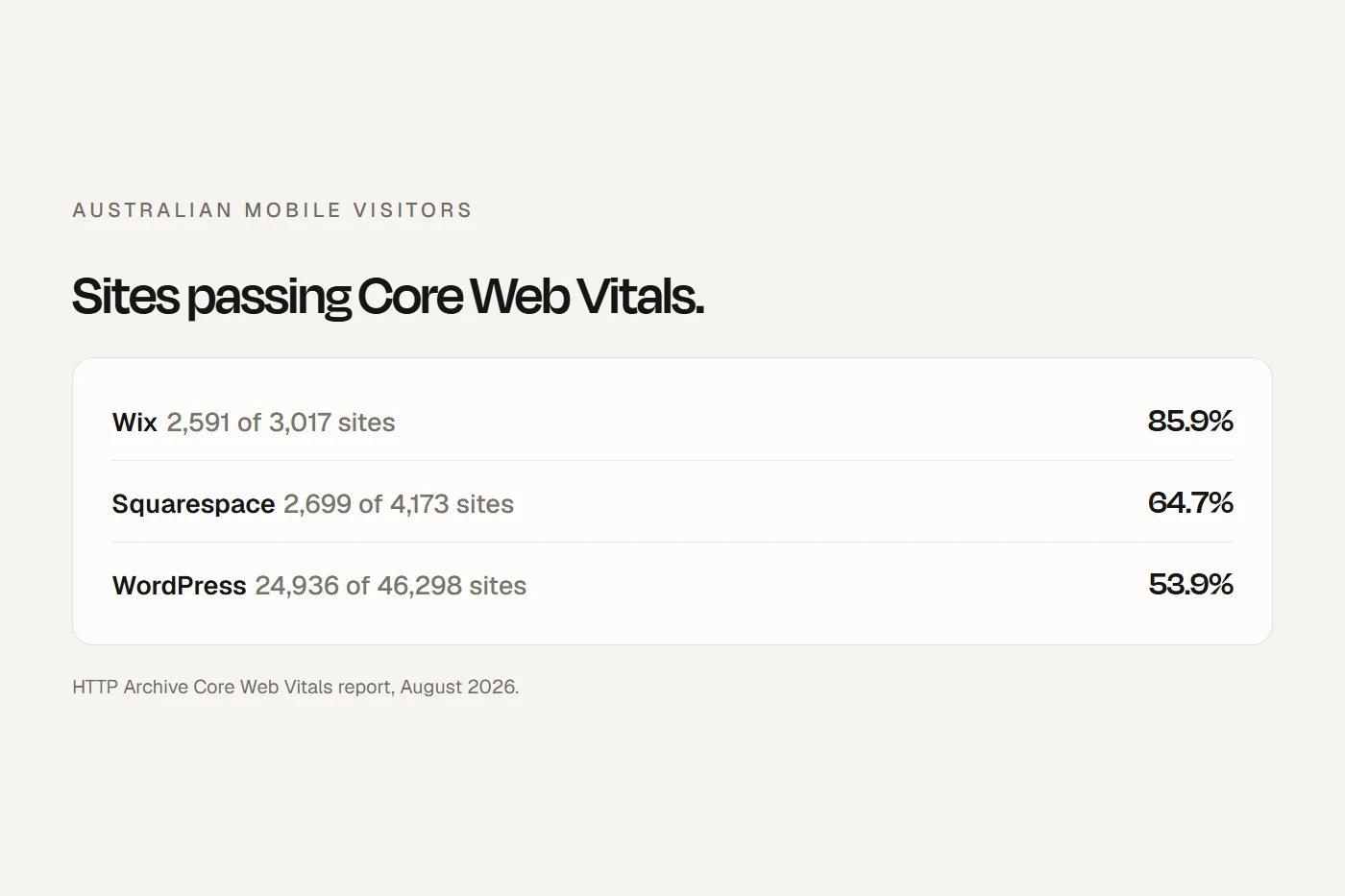
Google's Chrome browser records how fast real visitors find each site, and the HTTP Archive publishes it by platform. Switch between the overall pass rate and the individual measures.
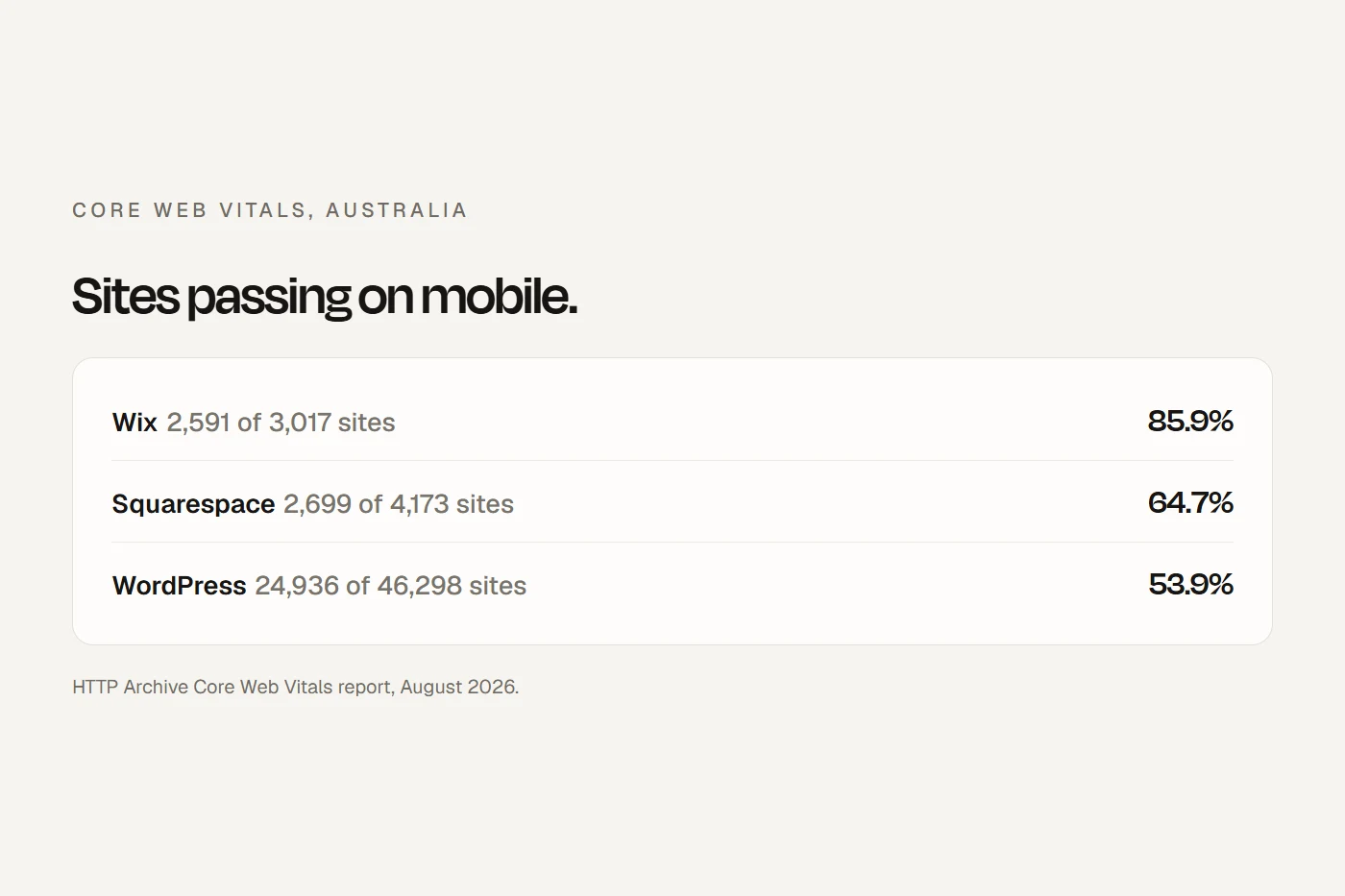
Squarespace sits between Wix and WordPress overall, and it's among the best for responsiveness. The weak spot is the first wait: only 12.7% of Squarespace sites gave Australian mobile visitors a good server response time, against 79.3% for visitors worldwide. Over the past year, Squarespace's Australian pass rate has swung between 56.2% and 69.8%, dipping in the months that server response collapsed. I couldn't confirm the cause, and it isn't something an owner can change.
What you can change is page weight. Squarespace's own advice is to keep images under 500 KB and each page under 5 MB, and the 2025 Web Almanac found Squarespace pages were the heaviest of the platforms it measured. And keep it in proportion: Google says good Core Web Vitals help but don't guarantee you'll rank at the top.
The AI crawler box
Under Settings, then Crawlers, Squarespace has a box called "Block known artificial intelligence crawlers". It's off by default, and Squarespace warns that ticking it "might negatively impact your site traffic". Here's what it actually covers, from Squarespace's list of 26 bots:
| Blocked when ticked | Not blocked |
|---|---|
| GPTBot (OpenAI training) | Googlebot (Google Search and AI Overviews) |
| ClaudeBot (Anthropic training) | Bingbot (Bing and Copilot) |
| Google-Extended (Gemini training, not Search) | OAI-SearchBot (ChatGPT search) |
| Applebot-Extended (Apple training) | ChatGPT-User |
| CCBot, Meta-ExternalAgent, Bytespider, Amazonbot and others | PerplexityBot and Claude-SearchBot |
Scroll the table sideways to see every column.
So, reading that list, ticking the box is mostly a training opt-out. It shouldn't take you out of Google, AI Overviews, ChatGPT search or Perplexity. What you must not tick by mistake is the box above it, "Block Search engine crawlers", which tells every search engine to stay away from your whole site. More on the bots in AI search for local businesses.
Will Squarespace hold your site back?
Seven questions. If you answer no to all of them, the platform isn't your problem.
Is your Squarespace site set up for Google?
Go through this in your Squarespace editor. Your ticks save in this browser.
- Your own domain is set as primary. The built-in .squarespace.com address "can't be removed", but it shouldn't be the one Google shows.
- The site is published, not in trial and not behind a site-wide password. "Search engines won't find trial, expired, or canceled sites."
- Settings, Crawlers: "Block Search engine crawlers" is unticked.
- Search Console is connected: Analytics, Search keywords, Connect, Allow. Data takes about 72 hours.
- Site title and SEO site description set: SEO/AI Visibility, SEO Settings, Search appearance, Home tab.
- Every page has its own SEO title and description: Pages panel, gear, SEO tab. Squarespace suggests titles of 70 characters or fewer.
- Page addresses read as words, all lowercase, with no random strings on posts saved before they had a title.
- Every changed or deleted address has a redirect in Developer tools, URL mappings, written like
/old-url -> /new-url 301, and the old page is disabled. - Alt text on every image block: click the block, the pencil, then the Content tab. Squarespace's SEO Report helps on 7.1 but skips images in blog posts and products.
- Business information filled in under Settings, Selling, Business Information. On Squarespace's own demo site, that's where the built-in business details appear to come from.
- Thank-you, test and duplicate pages hidden with "Hide page from search results".
- On an old 7.0 template with Ajax loading, check your analytics and redirects work, or move to 7.1.
- Your Google Business Profile is verified, with your hours, photos and recent reviews.
What actually decides whether you rank
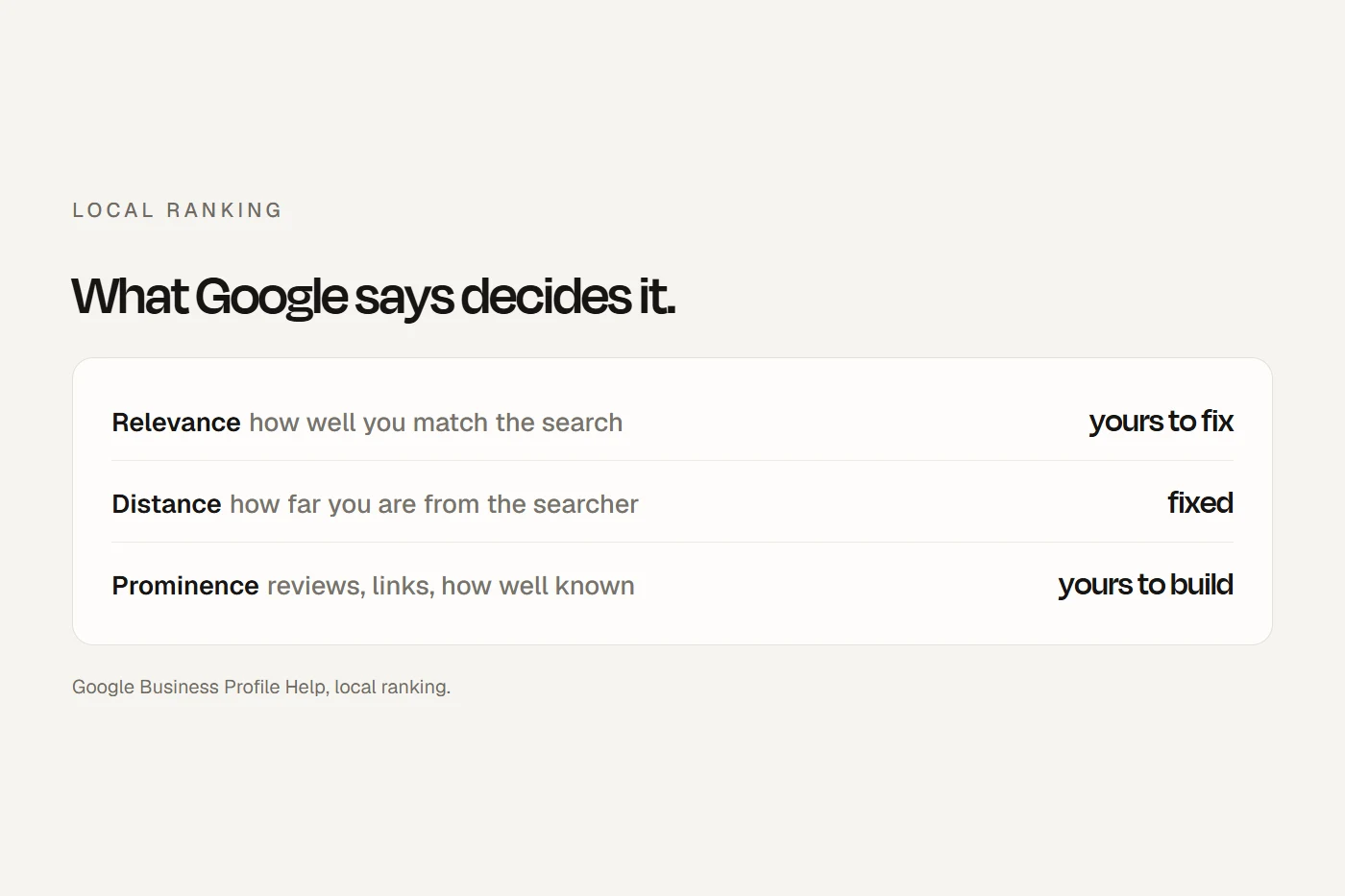
For a local business, the same things move rankings on Squarespace as anywhere else: a complete, verified Google Business Profile, reviews asked for the right way, a real page for each service with its own title, and links from other local sites. Squarespace's own checklist says to "Create a Google Business Profile" and add a contact page with your address and a map. I go through it all in local SEO for small businesses.
My view
If you're on Squarespace and happy with it, stay. Do the checklist, write proper titles and descriptions, add alt text, and never change a page's address without a redirect. Then spend your time on your Business Profile and your service pages. Moving platform won't fix thin pages or a neglected profile.
If you're choosing a platform, the SEO difference between Squarespace, Wix and WordPress is smaller than the difference in what each lets you own and control. I compare them in Squarespace vs WordPress and Wix vs Squarespace.
Questions I get asked
Is Squarespace good for SEO?
Yes, for most small businesses. It handles the sitemap, clean addresses, structured data and HTTPS for you, and lets you set titles, descriptions and redirects. The SEO work that's left is content, not code.
Who has better SEO, Wix or Squarespace?
Neither has an edge with Google. Wix sites passed Core Web Vitals more often for Australian mobile visitors (85.9% against 64.7% in August 2026), and Wix lets you edit robots.txt; Squarespace doesn't.
Which is better for SEO, WordPress or Squarespace?
WordPress gives you more control, and Squarespace does more for you. Squarespace sites were faster on average for Australian mobile visitors. For a local business, the platform matters less than the pages and the Google Business Profile.
What is the downside to Squarespace for SEO?
No robots.txt or structured data editing, no automatic redirects when you change an address, code changes only on Core and above, and slow server response for Australian visitors.
Does Squarespace offer SEO services?
No. Squarespace provides the tools, but its support team "can't assist with SEO strategy". You do the SEO yourself or hire someone.
Does blocking AI crawlers on Squarespace hurt my Google ranking?
It shouldn't. The box blocks AI training bots such as GPTBot and Google-Extended, not Googlebot, and Google says Google-Extended doesn't affect Search.
About this guide
Written by Joseph Alzein, founder of bdog. bdog builds websites on subscription, so I compete with Squarespace, and Squarespace doesn't pay me. Everything here was checked from Sydney on 11 October 2026 against Squarespace's help centre, Google's documentation, and the HTTP Archive's Core Web Vitals data for August 2026. Mueller's 2026 comment is quoted as reported by Search Engine Journal.
Main sources:
- Squarespace: how Squarespace optimizes your site for search
- Squarespace: URL mappings
- Squarespace: URL slugs
- Squarespace: Google SEO emails and console errors
- Squarespace: hiding your site from search results
- Squarespace: request that AI models exclude your site
- Squarespace: code injection
- Squarespace: SEO checklist
- Google: Sitemaps report
- Google: common crawlers
- Search Engine Journal: Mueller on CMS-injected links, July 2026
- Ahrefs: Squarespace SEO vs WordPress
- HTTP Archive: technology report
- Web Almanac 2025: CMS chapter